Free Online Wallpaper Visualizer — Visualize Wallpaper & Wall Art in Your Room

Upload a room photo to visualize wallpaper swatches, natural sisal grasscloth, botanical murals, and framed prints in real daylight before buying rolls. Use this wallpaper visualizer free and wall art visualizer online free to visualize wallpaper repeats, test custom swatches, and check authentic lamp shadows right in your browser.

100% Free Tab
Upload room & PNG export — no login
20 Wallpapers
Botanical, grasscloth, stripe & murals
Framed Prints
Preview diptychs & custom swatches
Repeat & Rolls
Straight, half-drop & 20.5"–36" specs
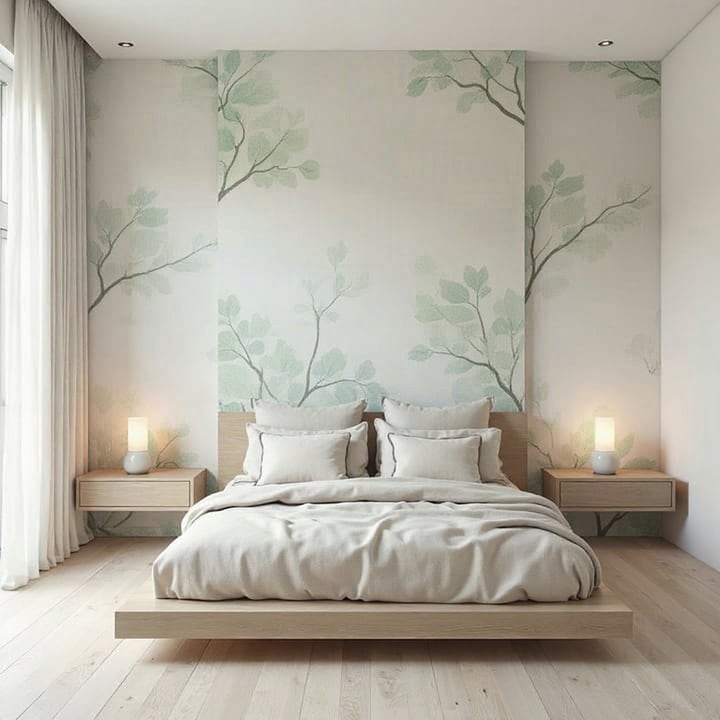
Wallpaper visualizer output preserving the exact bed, nightstands, lamps, and left window while applying a sage botanical Chinoiserie mural wallpaper behind the headboard
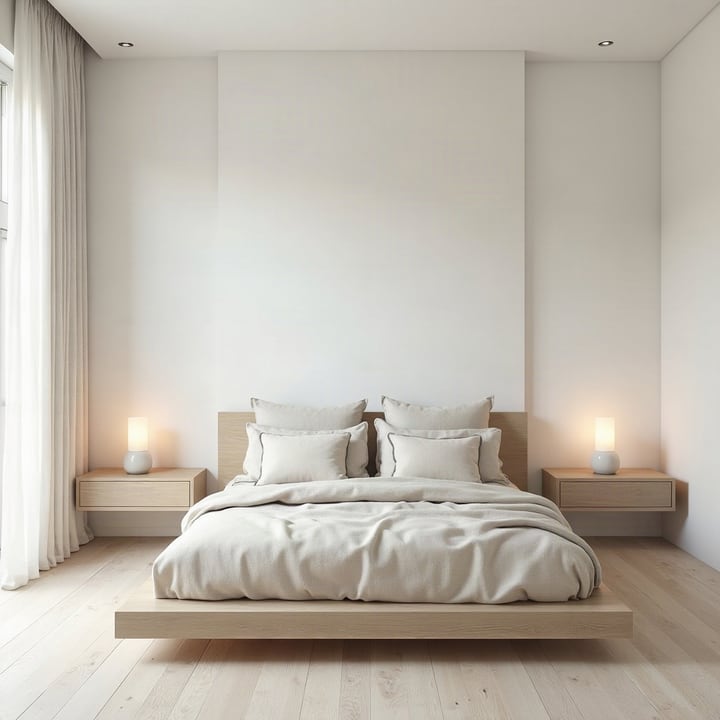
Original sunlit primary bedroom photo with white-oak platform bed, oatmeal linen bedding, twin ceramic lamps, and a bare off-white painted headboard wall
Before · Bare WallAfter · Sage Botanical

Drag the divider: white-oak bed, ceramic lamps, sheer linen curtain, and floorboards stay pixel-locked while the headboard wall transforms under real morning light.

Interactive Wallpaper Visualizer & Wall Art Visualizer Online Free

Upload a room photo into our wallpaper visualizer free tab (Tab 1 · Free PNG) to visualize wallpaper patterns, upload custom swatches, or preview prints in our wall art visualizer online free—then switch to AI Mode (Tab 2) for wrap-around shadows.

1. Room PhotoSample Loaded
2. Pattern & Roll Spec24" Half-Drop · 20.5" × 33 ft
Framed Wall Art
3. Wall Mask, Repeat & Light0% covered
Pattern Match
Lighting
Click any wall section to visualize wallpaper with natural room shadows
Room photo ready to visualize wallpaper (Sage Chinoiserie)BEFORESAGE CHINOISERIE
50%

Runs 100% locally in your browser with zero login and zero watermark. Test botanicals, natural grasscloth, custom uploaded swatches, or framed wall art prints—or switch to AI Mode for full wrap-around perspective corners and lamp bounce light.

Visualize Wallpaper & Framed Prints Across 4 Residential Rooms

Inspect how homeowners visualize wallpaper inside our wallpaper room visualizer and wall art visualizer online free—from woodland dining murals above wainscot and moody powder baths to sand grasscloth and terracotta limewash murals.

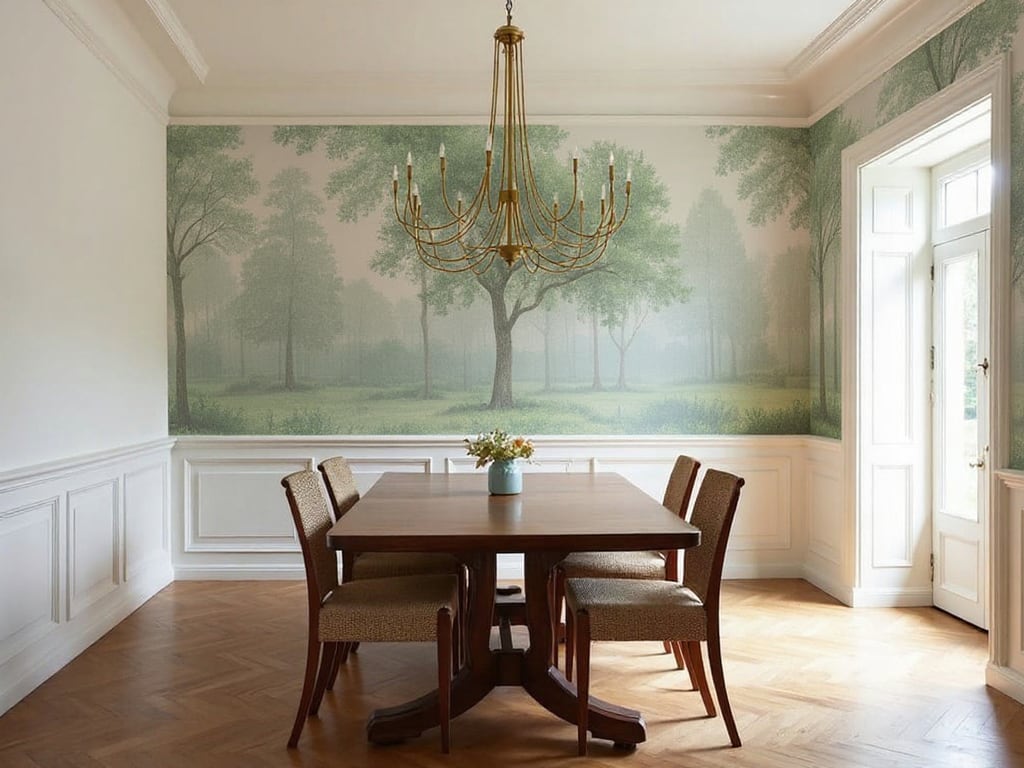
Wallpaper room visualizer preview covering upper dining walls above the chair rail with muted sage-olive woodland tapestry wallpaper
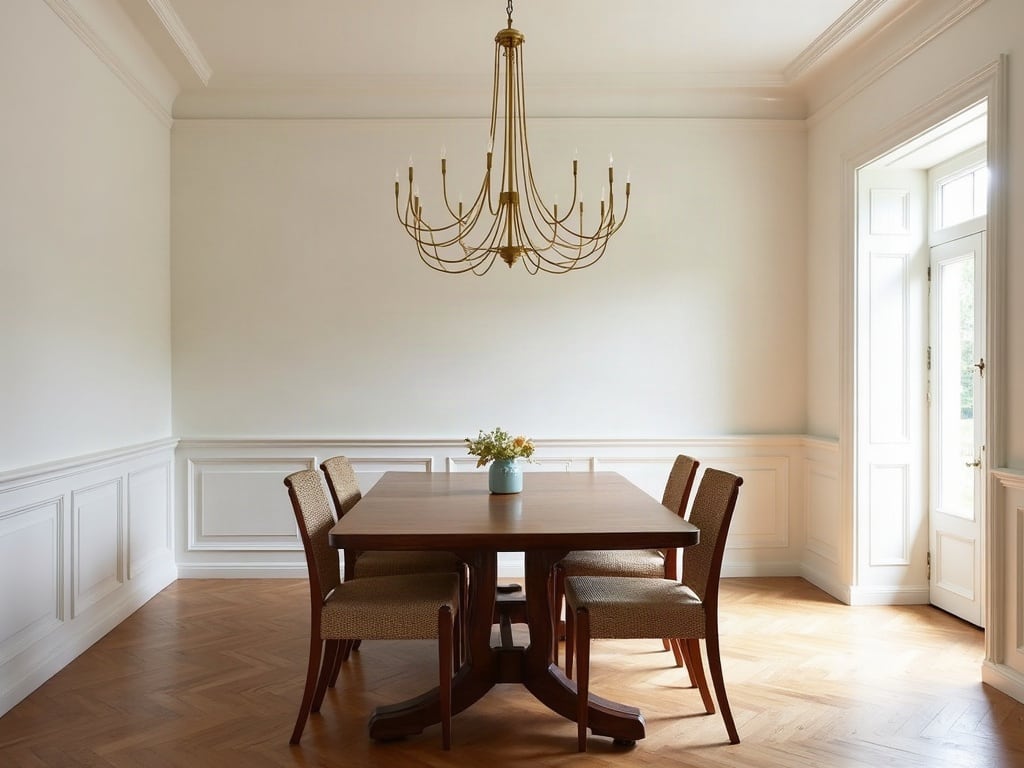
Sunlit formal dining room with walnut table, woven chairs, lower white chair-rail wainscot, and bare flat off-white upper walls
Bare Upper WallWoodland Tapestry
Dining Room Mural Above Wainscot4:3 · 1024×768

Bare Upper Drywall → Artisanal Woodland Tapestry Above Chair Rail

Empty drywall above white dining room chair-rail paneling often looks unfinished and stark under chandelier light. When you visualize wallpaper inside our wallpaper room visualizer, muted sage-olive woodland scenery immediately ties dark walnut seating to painted millwork without darkening the room.

  • Locks the walnut dining table, four woven chairs, brass chandelier, and white chair-rail paneling
  • Lets you visualize wallpaper mural panels cleanly across upper wall spans with zero awkward crop
  • Preserves authentic right-window sunbeams and soft overhead chandelier luminance gradients
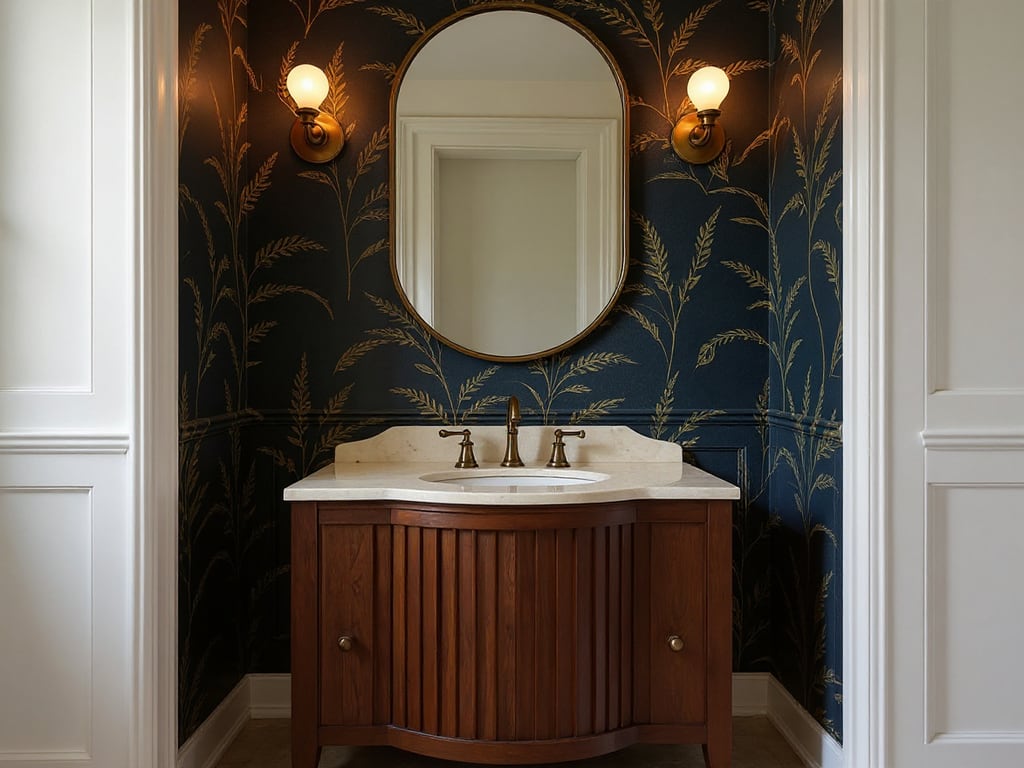
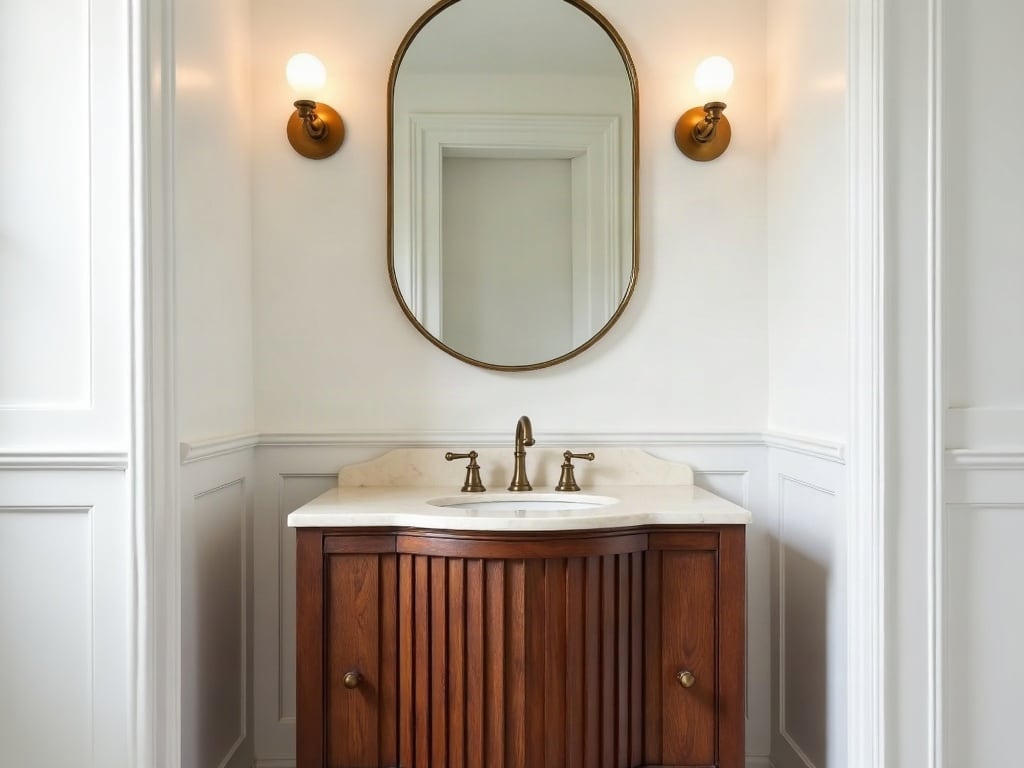
Wallpaper visualizer preview wrapping the powder room walls in midnight-indigo and warm-brass botanical wallpaper illuminated by warm sconces
Residential powder room with fluted walnut vanity, oval brass mirror, twin opal sconces, and plain stark white painted walls
Stark WhiteMidnight Botanical
Moody Powder Room Wallpaper4:3 · 1024×768

Stark White Powder Bath → Midnight-Indigo & Brass Botanical Foliage

Compact windowless powder rooms are the safest place to embrace dramatic dark wallpaper, yet tiny paper clippings never show how twin 2700K sconces illuminate deep ink grounds. Running a snapshot through this wallpaper visualizer app lets you visualize wallpaper contrast before ordering rolls.

  • Preserves the fluted walnut vanity, honed marble top, oval brass mirror, and opal wall sconces
  • Previews realistic 2700K sconce glow halos radiating across matte Type I botanical wallpaper
  • Checks half-drop motif balance around tight mirror edges and vanity backsplashes
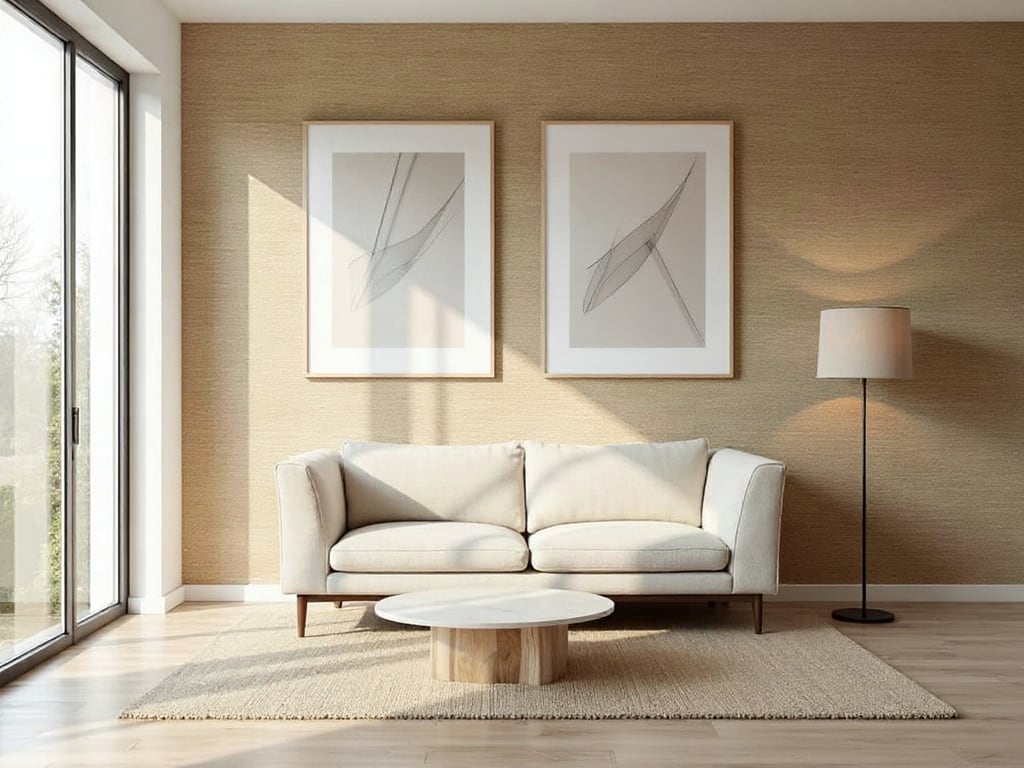
Wall art visualizer online free and wallpaper preview showing woven warm-sand sisal grasscloth paired with twin oak-framed abstract prints above the sofa
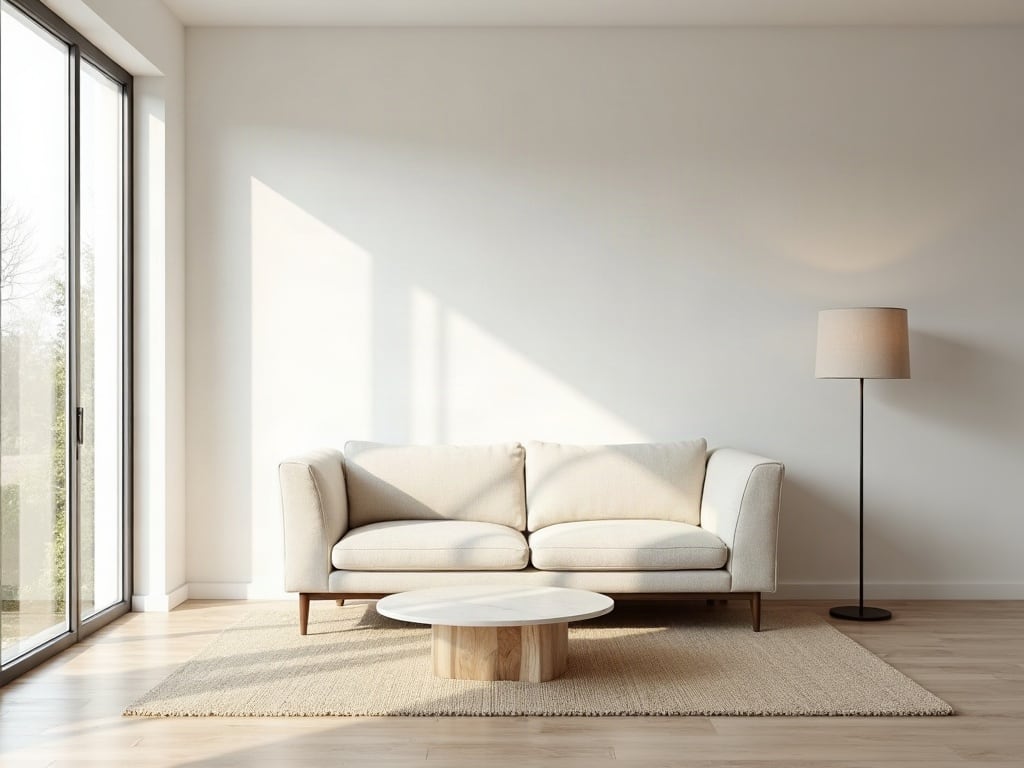
Bright Scandinavian living room with cream bouclé sofa, round coffee table, and wide blank off-white wall behind the sofa
Blank Sofa WallGrasscloth & Art
Wall Art Visualizer Online Free4:3 · 1024×768

Blank Living Room Wall → Woven Sand Grasscloth & Oak-Framed Diptych

Pairing textured sisal grasscloth with framed prints requires getting both fiber tone and frame proportion right above a sofa. Our wall art visualizer online free and wallpaper visualizer tool let you visualize wallpaper warmth alongside gallery-matted diptych proportions in one click.

  • Keeps the cream bouclé sofa, round coffee table, wool rug, floor lamp, and left patio glass intact
  • Previews subtle horizontal sisal grasscloth fiber slubs that add architectural depth without clutter
  • Uses the 60%–75% sofa-width rule inside our wall art visualizer to balance twin slim oak frames
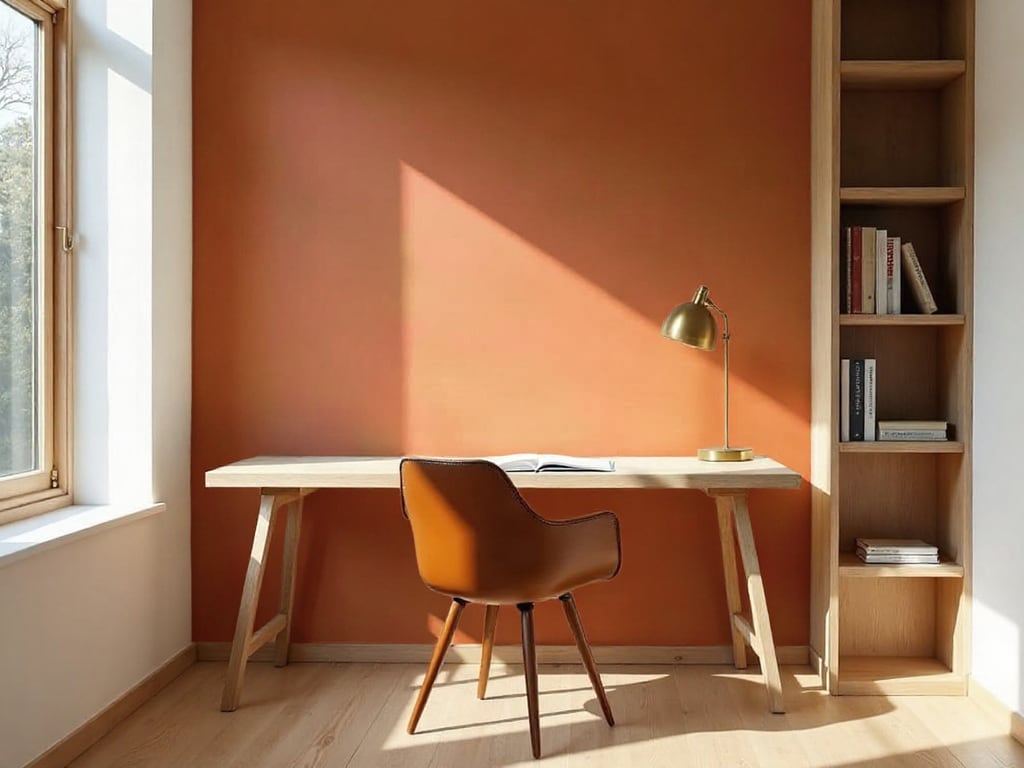
Wallpaper visualizer output showing warm terracotta-clay matte limewash mural wallpaper behind the writing desk
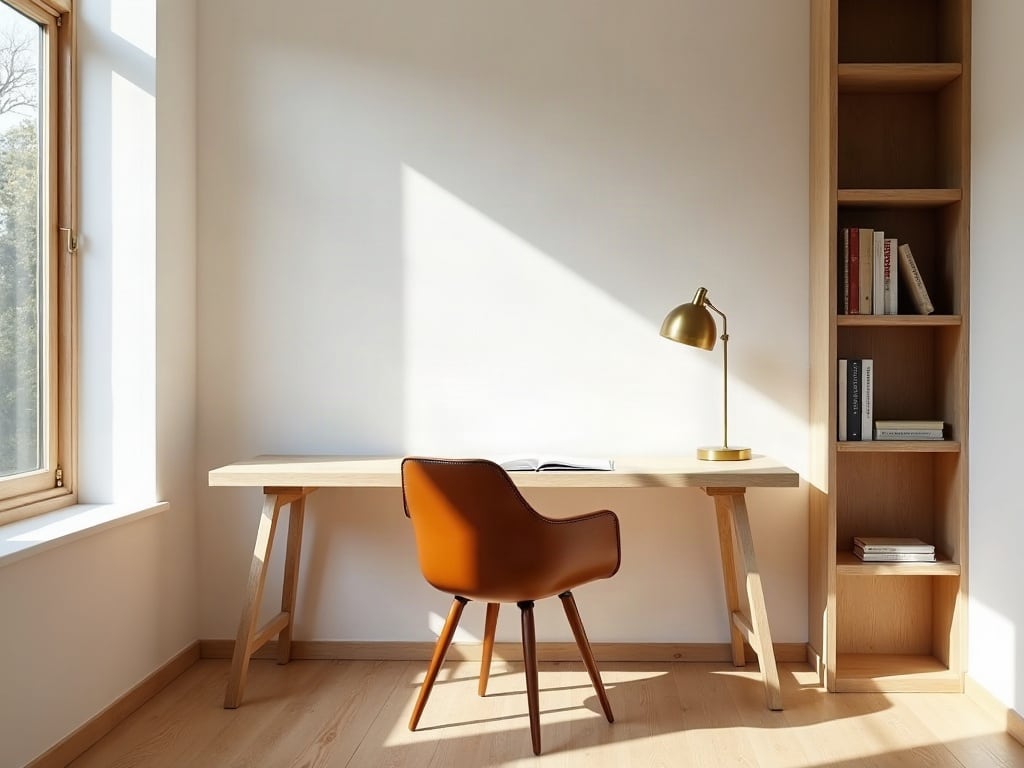
Sunlit home study with white-oak writing desk, cognac leather chair, bookshelf, and bare cream painted rear wall
Plain Cream WallTerracotta Mural
Textured Mural Study Wall4:3 · 1024×768

Flat Cream Desk Wall → Warm Terracotta Clay Limewash Mural Wallpaper

Rich mineral terracotta murals ground a sunlit home study without distracting from monitor work. Previewing matte clay wallpaper in our wallpaper visualizer online free lets you visualize wallpaper depth beside cognac leather, pale oak shelving, and diagonal afternoon window light.

  • Locks the solid white-oak writing desk, cognac chair, brass architect lamp, and right bookcase
  • Demonstrates calm matte non-woven limewash wallpaper texture with zero harsh window glare
  • Preserves razor-sharp diagonal sunlight beams and warm shadow transitions across the rear wall

Why Designers & Homeowners Use This Wallpaper Visualizer App

A single 8×10 inch wallpaper memo sample rarely shows how a 24-inch half-drop repeat, woven sisal grasscloth, or framed diptych behaves across a full sunlit wall.

01 · ZERO-LOGIN FREE TAB

Browser Wallpaper Visualizer Free + Wall Art Visualizer Online Free

Skip App Store downloads or store-locked catalogs. Run this wallpaper visualizer app directly on iPhone, Android, iPad, Mac, or Windows—upload your room photo to visualize wallpaper across 20 curated patterns, upload your own retailer swatch, or preview framed prints in our wall art visualizer online free with zero sign-up.

02 · REPEAT & SHADOWS

Real Straight, Half-Drop & Mural Repeat Controls With Room Shadows

Flat pasted textures destroy depth around lamps and headboards. Our wallpaper visualizer tool preserves your wall's original daylight falloff and 2700K sconce gradients so you can visualize wallpaper with Straight Match, 50% Half-Drop, and Full Mural scaling from 55% to 175%.

03 · AI ROOM MODE

One-Click Handoff to AI Mode for Complex Corners & Wainscot Trim

Working around crown molding, chair rails, oval powder-room mirrors, or multi-wall corners? Switch to Tab 2 inside this wallpaper room visualizer using the exact same uploaded room photo—backed by 40 welcome credits on Google sign-in for crisp 1080p and 4K exports.

How to Visualize Wallpaper & Framed Prints in 3 Simple Steps

Move from a plain smartphone wall snapshot to a realistic wallpaper and framed gallery comparison in under 15 seconds.

  1. Step 01

    Upload Your Room Photo or Pick a Sample Space

    Drop a well-lit JPEG, PNG, or WebP photo into our wallpaper visualizer free canvas—or click any of the 5 built-in bedroom, dining, powder room, living room, and study spaces instantly with zero sign-up.

  2. Step 02

    Select Wallpaper Swatch, Repeat Match or Gallery Frame

    Browse Botanical, Grasscloth, Geometric, and Mural presets inside this wallpaper visualizer app to visualize wallpaper immediately, upload your own custom swatch or artwork print, switch Straight vs. Half-Drop repeat, and click walls to mask.

  3. Step 03

    Compare Split View, Export Free PNG or Run AI Mode

    Drag the Before/After split slider across 2700K, 4000K, and 5500K room lighting to verify undertone balance, download a watermark-free PNG via this wall art visualizer online free, or switch to Tab 2 for AI 4K renders.

Free Browser Wallpaper Visualizer Tool vs. AI Room Mode

Ideal Workflows to Visualize Wallpaper With RoomPoise

  • Previewing botanical Chinoiserie murals, woven sisal grasscloth, heritage stripes, and limewash murals before ordering double rolls
  • Using our wall art visualizer online free to test oak diptychs, brass single frames, and gallery trios—including your own uploaded print files
  • Checking whether a 24-inch half-drop wallpaper motif feels balanced or overly busy on compact powder room walls and headboard accent zones
  • Running a responsive web wallpaper visualizer app right in your phone browser during showroom visits to visualize wallpaper with zero install
  • Exporting watermark-free PNG wallpaper mockups for partners or 4K AI presentation boards for interior design clients

Honest Technical Boundaries (Screen Preview vs. Physical Rolls)

  • Always order physical memo samples before purchasing full double rolls: backlit screens cannot reproduce tactile sisal fibers, metallic ink sheen, or dye-lot batch shifts
  • Tab 1 (Free Browser Canvas) excels at rapid flat-wall pattern scaling, custom swatch uploads, and framed print sizing, while angled multi-wall corners, ornate chandeliers, and glossy sconces render cleanest in Tab 2 (AI Mode)
  • This wallpaper visualizer online free helps you evaluate scale, undertone, and repeat rhythm rather than replacing exact wall-perimeter tape measurements for roll ordering
  • Photograph your room straight-on at 120 cm chest height in even daylight so vertical wallpaper stripes and framed prints align without keystone tilt

Understanding Straight Match, Half-Drop Repeat & Roll Math Before You Visualize Wallpaper

Ordering wallpaper without checking pattern match type is the fastest way to run one strip short mid-installation. When you visualize wallpaper inside our wallpaper room visualizer, every preset lists its match specification—Straight Match, Half-Drop (50% stagger), Random Match, or Full Wall Mural—so you see both visual rhythm and real material overage upfront.

A standard Euro roll measures 20.5 inches wide by 33 feet long (56 sq ft gross), while a US double roll typically measures 27 inches wide by 27 feet long (60.75 sq ft gross). Natural woven grasscloth wallpaper ships in wider 36-inch by 24-foot bolts (72 sq ft) with a random match that intentionally highlights organic horizontal paneling seams.

Because large 20–27 inch botanical half-drop repeats require shifting every alternate strip vertically by half a repeat to align blossoms seamlessly, budget 15%–25% extra roll allowance compared to 10% for random-match grasscloth or narrow stripes.

Straight Match (6"–18" Repeat)
Horizontal motifs align straight across adjacent strips—ideal for vertical block-print stripes, Art-Deco fans, and geometric trellises with roughly 10%–15% trim waste.
Half-Drop Match (21"–27" Repeat)
Every second strip drops vertically by half the pattern repeat, creating diagonal botanical flow across large walls without rigid horizontal rows; allow 15%–25% overage.
Random Match Grasscloth & Panoramic Murals
Natural sisal and hemp grasscloth panel cleanly side-by-side with organic color paneling, while custom scenic murals print sequentially to exact wall width and height.

“Wallcoverings classified under ASTM F793 Type I are engineered for residential and light-duty interiors, while Type II heavy-duty substrates provide superior scrubbability and tear resistance for high-traffic corridors and hospitality spaces.”

Pairing Textured Wallpaper & Framed Prints With a Wall Art Visualizer Online Free

Deciding whether to hang framed prints over wallpaper—and how wide those frames should span above a sofa, console, or headboard—is where many rooms stall. Using our wall art visualizer online free directly inside Tab 1 lets you overlay an Oak Diptych, Brass Portrait, or Gallery Trio onto bare walls or woven grasscloth and upload your own artwork JPEG or PNG to verify frame scale instantly.

Professional gallery hangers rely on two reliable spatial ratios: keep total framed print width between 60% and 75% of the furniture piece beneath it (for example, 145–170 cm total span over a 220 cm sofa), and hang the vertical midpoint of the composition at 145–152 cm (57–60 inches) eye level with 15–20 cm breathing space above the sofa back.

When layering prints onto patterned paper in this wall art visualizer and wallpaper visualizer tool, pair busy botanical wallpaper with generous 3–4 inch archival white mats so prints stand cleanly apart from surrounding foliage.

Sofa & Headboard Span Rule (60%–75% Width)
Prevents undersized single frames from floating awkwardly on wide living room or primary bedroom walls.
Gallery Spacing & Eye-Level Center (57"–60")
Keep 5–8 cm (2–3 in) gaps between diptych or trio frames so multiple pieces read as one unified architectural block.
Grasscloth + Slim Oak or Brass Frames
Tactile warm-sand sisal or oat linen grasscloth gives framed prints museum-grade warmth without competing pattern clutter.

Choosing Non-Woven, Peel-and-Stick & Grasscloth Substrates in a Wallpaper Visualizer App

Once you visualize wallpaper aesthetically in our wallpaper visualizer app, match the physical substrate to your room's humidity and tenancy. Paste-the-wall matte non-woven wallpaper is breathable, dimensionally stable (will not shrink at seams), and dry-strips cleanly when you redecorate—making it the top pick for bedrooms, dining rooms, and studies.

For powder rooms and half-baths without shower steam, Type I matte or lightly coated washable non-woven botanical wallpaper holds deep midnight-indigo and brass pigments crisp around mirror splashes. Renters who visualize wallpaper for temporary makeovers can opt for removable peel-and-stick matte vinyl on smooth eggshell or satin-primed drywall (avoid applying peel-and-stick onto chalky flat paint or orange-peel texture).

If you specify wallcoverings for commercial boutiques, hospitality suites, or multi-family lobbies, confirm Class A flame-spread certification under ASTM E84 alongside visual layout sign-off in this wallpaper visualizer online.

“Interior wall and ceiling finish materials tested to ASTM E84 Class A achieve a Flame Spread Index of 0 to 25 and a Smoke-Developed Index of 450 or less for architectural fire-safety compliance.”

Wallpaper Visualizer Free Browser Canvas vs. AI Room Rendering Credits

RoomPoise keeps everyday wallpaper and artwork layout planning completely free in your browser while disclosing GPU rendering costs transparently. Tab 1 in this wallpaper visualizer online free runs 100% locally on your device—letting you visualize wallpaper with unlimited room photo uploads, all 20 botanical, grasscloth, geometric, and mural presets, custom swatch/artwork uploads, and watermark-free PNG downloads with zero login.

When you want full AI wallpaper rendering (Tab 2) inside our wallpaper room visualizer for wrap-around multi-wall corners, complex chair-rail cutouts, or realistic 2700K sconce glow across textured sisal, signing in with Google grants 40 welcome credits (valid 7 days, no credit card required) covering 2 custom 1080p renders at 20 credits each. Every visitor can test our 5 built-in sample spaces instantly in the browser without logging in, and new Google accounts receive 40 welcome credits (2 custom 1080p renders, valid 7 days, no card required). Standard 1080p renders cost 20 credits per image, while 4K UHD architectural exports use 40 credits on paid tiers. Studio memberships start at $20/month billed annually ($240/year on Starter, or $25/month billed monthly), $40/month billed annually ($480/year on Pro), and $60/month billed annually ($720/year on Studio).

Room-by-Room Wallpaper Visualizer Substrate, Repeat & Roll Reference

Practical wallcovering substrate, pattern match, roll coverage, and lighting specifications across five residential rooms.

RoomPoise wallpaper visualizer recommended substrate, pattern match type, roll dimensions, waste overage, and framed print pairing by room
Room & Wall ZoneRecommended SubstrateIdeal Pattern MatchTypical Roll & OverageLighting & Framing Tip
Primary Bedroom HeadboardMatte Non-Woven or Linen MuralHalf-Drop / Mural20.5"×33 ft · +15–20%Soft matte hides 2700K bedside lamp glare; center botanical motif behind headboard
Dining Room Above WainscotLinen Non-Woven Scenic TapestryPanoramic MuralCustom Panel · +10%Pair warm-white chair-rail millwork with low-contrast woodland scenery
Powder Room / Half BathWashable Type I Matte Non-WovenHalf-Drop Botanical20.5"×33 ft · +20%Deep indigo or pine grounds glow dramatically under 2700K opal brass sconces
Living Room Focal WallNatural Sisal or Oat Linen GrassclothRandom Match + Prints36"×24 ft · +10%Size framed diptychs to 60%–75% of sofa width with generous 3-inch white mats
Home Study / Reading NookNon-Woven Limewash or Peel & StickMural / Straight Stripe20.5"×33 ft · +10–15%Matte terracotta murals or subtle stripes stay glare-free beside desk windows

Transparent Interior Studio Plans

Cancel anytime · Unused credits roll over · Full commercial rights

Save $60/yr

Starter

Ideal for homeowners & apartment refreshes

$20/month$25/mo

Total $240 billed yearly

2,880 Fast Credits / Year (240 / mo)

Up to 144 room renders (1080p) or 72 in 4K UHD / yr

  • 240 fast-queue interior credits / mo (2,880 / yr)
  • All 8 architectural styles & 6 room types
  • Photo-to-Render structure lock & layout rearrange
  • Watermark-free 1080p & 4K UHD room exports
  • Unused credits roll over while subscribed
  • Private stealth room uploads (hidden from gallery)
  • Full commercial rights for staging & client decks
  • Cancel anytime in one click

Credit Metering Schedule

1080p Photo Room Redesign20 cr / restyle
Virtual Furniture Rearrangement20 cr / layout
Empty Room Virtual Staging20 cr / stage
4K UHD Architectural Upscale40 cr / export
Save $120/yr
For Designers

Pro

Designed for interior designers & multi-room projects

$40/month$50/mo

Total $480 billed yearly

5,760 Fast Credits / Year (480 / mo)

Up to 288 room renders (1080p) or 144 in 4K UHD / yr

  • 480 priority fast-lane GPU credits / mo (5,760 / yr)
  • 4× parallel room style & layout batch comparisons
  • 4K UHD material & lighting micro-texture rendering
  • All 5 architectural aspect ratios (4:3 to 16:9)
  • Automatic rollover of unused monthly/annual credits
  • Private client workspace & zero watermarks
  • Full commercial freelance & client-deck license
  • Priority email support (hello@roompoise.com)

Credit Metering Schedule

1080p Photo Room Redesign20 cr / restyle
Virtual Furniture Rearrangement20 cr / layout
Empty Room Virtual Staging20 cr / stage
4K UHD Architectural Upscale40 cr / export

Need multi-seat agency or brokerage billing? Email hello@roompoise.com

Frequently Asked Questions About Our Wallpaper Visualizer App & Tool

Can I visualize wallpaper in my room using this wallpaper visualizer free without signing up?

Yes. Tab 1 in our wallpaper visualizer free workspace runs 100% locally in your browser with zero login, zero credit card, and zero watermark. Upload any JPEG, PNG, or WebP room photo to visualize wallpaper across 20 botanical, grasscloth, geometric, and mural patterns (or upload your own swatch) and download PNG results free.

Does this also work as a wall art visualizer online free for my own artwork prints?

Yes. Inside Tab 1, pick Oak Diptych, Brass Frame, or Gallery Trio under Framed Wall Art to preview gallery proportions on bare or wallpapered walls—then click Upload Art Print to drop your own JPEG, PNG, or WebP print directly inside the framed mats for free.

Can I upload a custom wallpaper swatch image from a store or brand?

Yes. With Framed Wall Art set to No Art, click Upload Swatch in Step 2 of our wallpaper visualizer tool to upload any seamless swatch image from your computer or phone. You can then visualize wallpaper in Straight Match or Half-Drop repeat and resize pattern scale from 55% to 175% right on your wall.

Do I need to download a mobile wallpaper visualizer app to use RoomPoise on my phone?

No install is needed. RoomPoise works directly in Safari, Chrome, and Edge on iPhone, iPad, Android, Mac, and Windows as a browser-native wallpaper visualizer app—so you can snap a bedroom, dining, or powder room photo and visualize wallpaper anywhere.

How does Tab 2 (AI Mode) differ from the wallpaper visualizer online free canvas?

Tab 1 lets you visualize wallpaper repeats, custom swatches, and framed prints locally in milliseconds at zero cost. Tab 2 sends your photo to our depth-locked fal.ai model (20 credits for 1080p, 40 credits for 4K) to wrap complex multi-wall corners, cut cleanly around chandeliers and oval mirrors, and synthesize realistic 2700K sconce reflections.

How much does AI Mode cost if I want 4K architectural wallpaper boards?

You can explore all 5 interactive sample transformations right away with no sign-up, and new Google accounts receive 40 welcome credits (valid 7 days, no card required) covering 2 custom 1080p renders at 20 credits each (40 credits for 4K UHD). For watermark-free 4K commercial downloads, multi-batch comparisons, and private uploads, plans start at $20/month ($240/year, or $25/month monthly) on Starter, $40/month ($480/year) on Pro, and $60/month ($720/year) on Studio.

Are photos of my bedroom or home kept private in this wallpaper room visualizer?

Yes. In Tab 1 (Free Browser Canvas), your room photo and custom swatch files stay 100% on your local device and never upload to a server. In Tab 2 (AI Mode), keep Private Visibility enabled so uploaded rooms and 4K renders remain strictly inside your private account workspace.

Visualize Wallpaper & Framed Prints in Your Real Room — Free Online

Upload a room photo to visualize wallpaper in our wallpaper visualizer free and wall art visualizer online free with zero login, or claim 40 welcome credits for 4K AI renders.

More Interior AI Studios & Specialized Planners

AI Room Design Studio

Redesign any room from a photo with free AI room design online. Test layouts, rearrange furniture, and preview 20+ interior styles—no sign-up.

Open Tool

Room Designer

Plan a room designer layout from a photo in a free room designer and 3D room design app. Restyle lounges, bedrooms, or game rooms instantly.

Open Tool

Interior Design App

Upload a room photo to our free AI interior design app and browser interior design software. Restyle kitchens, baths, or bedrooms in 15 sec.

Open Tool

AI Living Room Design

Transform your lounge with AI living room design from any photo. Keep walls, windows, and fireplaces locked while testing sofas, rugs, and styles.

Open Tool

Furniture Visualizer

Preview sofas, dining tables, and beds in your room photo with an AI furniture visualizer online. Test scale, layout, and lighting in seconds.

Open Tool

Paint Visualizer

Free AI paint color visualizer & interior paint simulator. Upload a photo to try wall colors, color match paint from photo, and test shades.

Open Tool

Virtual Staging

Fast MLS virtual staging and virtual house staging online in 15s. Furnish vacant rooms, erase clutter, or turn day exteriors into 4K twilight.

Open Tool

Tile Visualizer

Try our free online tile visualizer and bathroom tile visualizer. Upload a photo to preview floor tiles, tile layout patterns, and grout live.

Open Tool

Siding Visualizer

Free house siding visualizer and brick visualizer online. Upload a house photo to simulate vinyl siding, metal roof, and exterior color combos.

Open Tool

Best Interior Design Apps

Compare the 10 best interior design apps, best AI for interior design, and free home design software for 2026—plus test your room photo live.

Open Tool

Exterior Paint Visualizer

Preview house siding, brick, and trim with our free exterior paint visualizer or exterior paint color visualizer. Upload a house photo online.

Open Tool

Room Planner

Plan your room with our free online room planner tool and 3D room planner. Upload a photo to test furniture layouts and walkways—no download.

Open Tool