10 Best Interior Design Apps & AI Home Design Software Compared (2026)

Hands-on, data-backed comparison of the best interior design apps, best AI for interior design, and free home design apps across web, Mac, Windows, and iOS. We benchmarked geometry accuracy, free tiers, kitchen and bathroom workflows, and real pricing across 10 leading best interior design apps—plus embedded a live try-on room uploader below so you can test your own photo immediately.

10 Apps Tested
AI restylers, 3D planners & CAD
2026 Pricing
Free tiers, paywalls & watermarks
Web · Mac · iOS
Browser, desktop & LiDAR tools
Try-On Live
Embedded photo uploader included
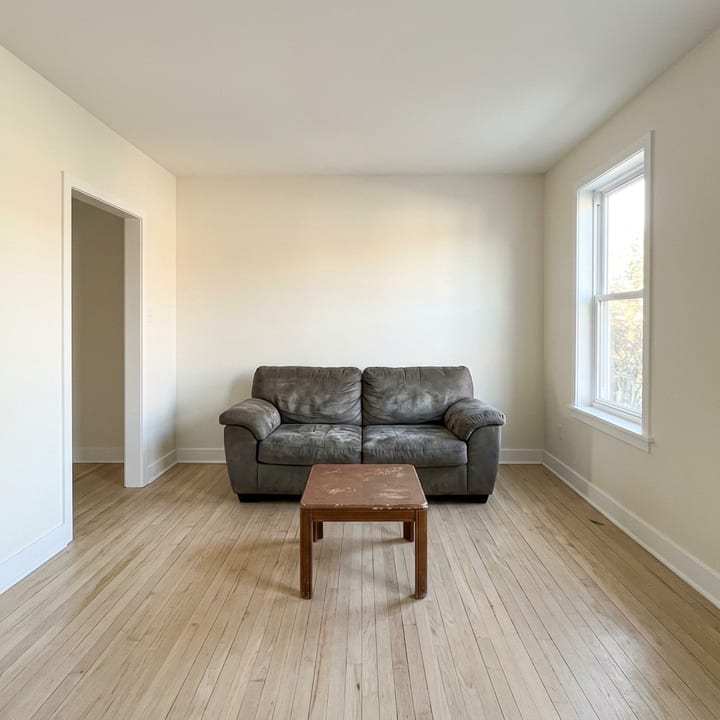
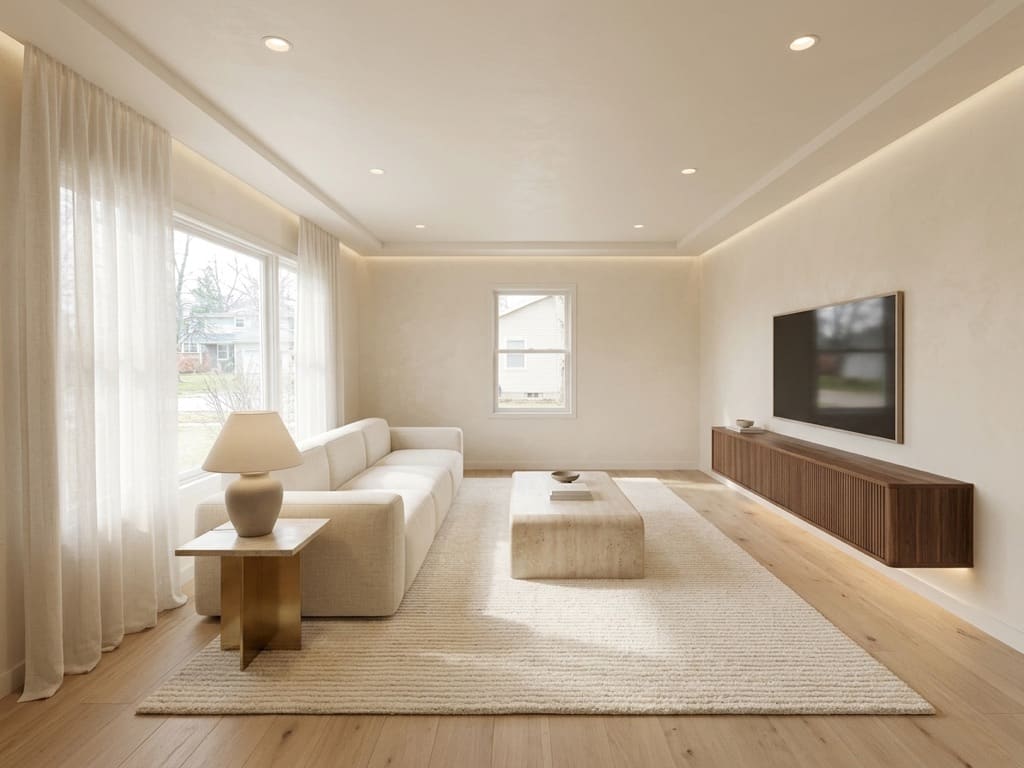
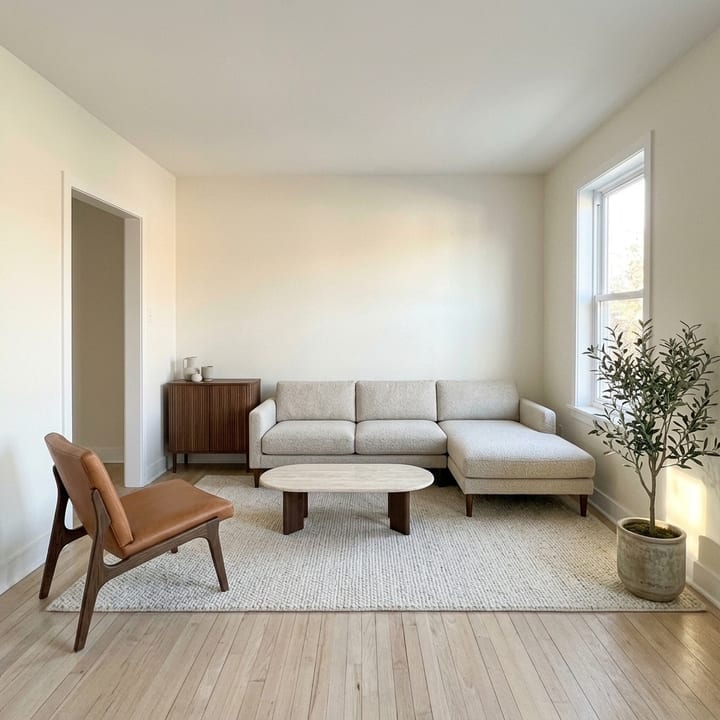
Geometry-locked AI restyle benchmark keeping exact walls, windows, and oak flooring unchanged while updating sofa, rug, and 2700K lighting
Original living room photograph used as the standardized 2026 test room across the best interior design apps
Before · Test PhotoAfter · Geometry Locked

Our standardized 2026 benchmark test: the best AI interior design app must keep real windows, corners, and sightlines pixel-locked rather than hallucinating impossible rooms.

Embedded Try-On Room Uploader: Test AI Interior Design Live

Before comparing all 10 best interior design apps in our matrix below, upload your own smartphone room photo—or click one of 5 benchmark rooms—to experience perspective-locked AI restyling directly in your browser.

Room Photo ReferenceJPG / PNG / WebP ≤ 16 MB
Selected reference room preview

Original Living Room Photo

Studio sample active

Or load a sample space:
Space Category
Layout & Geometry Mode
Interior Style (Warm Minimalist)
208/3000
Resolution
Variations
Frame Ratio (1:1)
Private Visibility (Hide Home Photo)
Sample Room Preview (No Login)0 Credits

Photo-Locked AI Restyle

Download
Warm Minimalist interior render generated in RoomPoise
Uploaded reference room photo before interior redesign
Reference PhotoWarm Minimalist

Recent Studio Concepts (3)

Open My Saved Rooms →

Best Interior Design Apps Visual Benchmarks: Living Room, Bedroom, Kitchen & Bath

Different home design apps shine in different rooms. Inspect four standardized visual tests showing what to expect from the best interior design apps, best AI room design free trials, kitchen tools, and bathroom visualizers.

Warm Minimalist benchmark output showing locked window geometry, tailored linen seating, and layered 2700K lighting
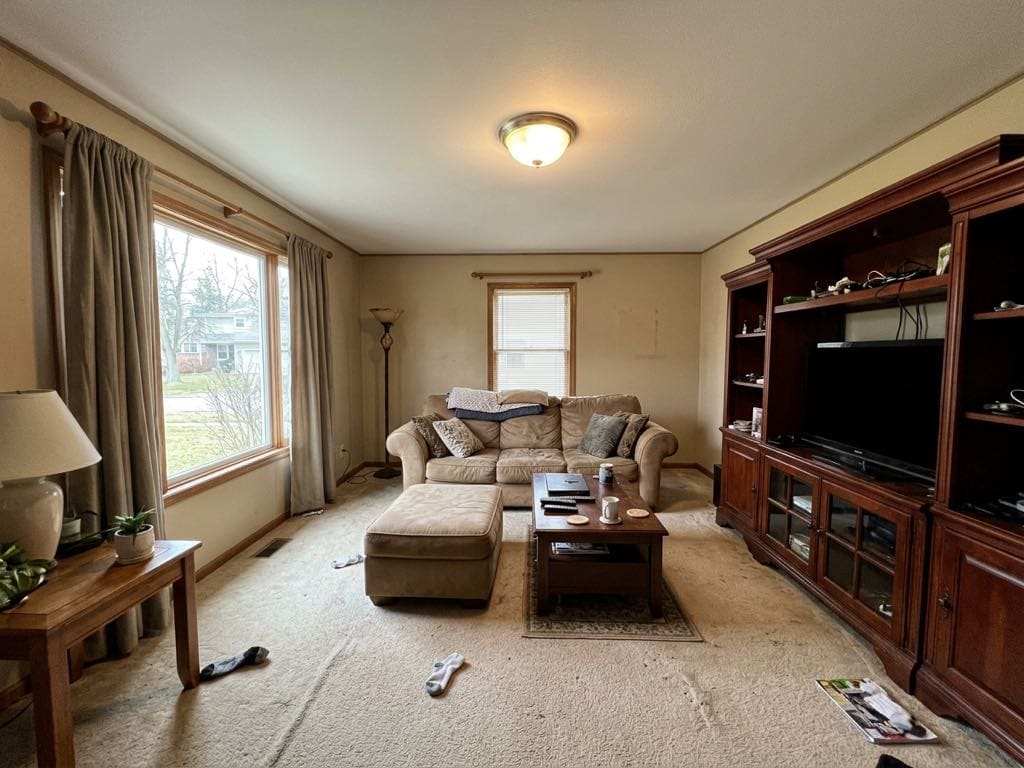
Original living room photo used to benchmark geometry preservation across the best AI interior design apps
Original RoomDepth-Locked AI
AI Room Design Benchmark4:3 · 1024×768

Living Room Restyle — Geometry-Locked AI vs. Hallucinated Re-Renders

When testing the best AI for interior design on a lived-in lounge, the biggest differentiator between apps is structural fidelity. Many consumer generators warp window frames or invent extra walls, whereas depth-conditioned AI home design apps keep your existing shell fixed while replacing upholstery, rugs, and lighting.

  • Benchmarks how cleanly an AI interior design app locks windows, ceilings, and floor planks
  • Demonstrates why photo-based AI beats manual 3D modeling when you want concepts in 15 seconds
  • Ideal starting benchmark for homeowners asking how do I design a room from a single photo
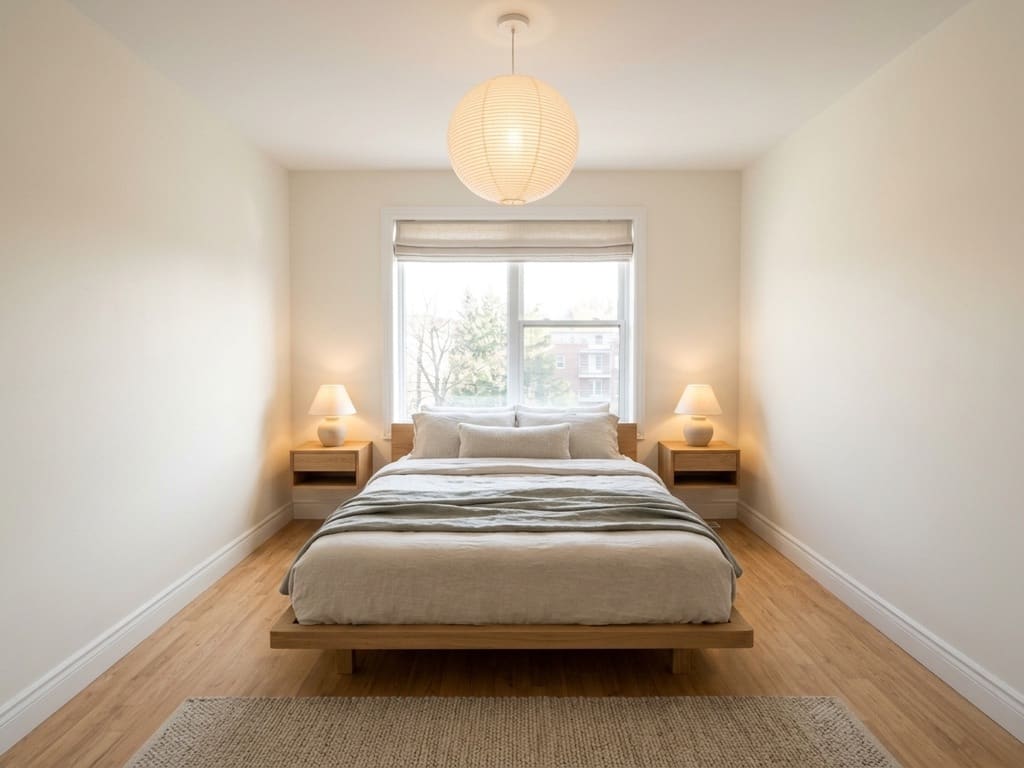
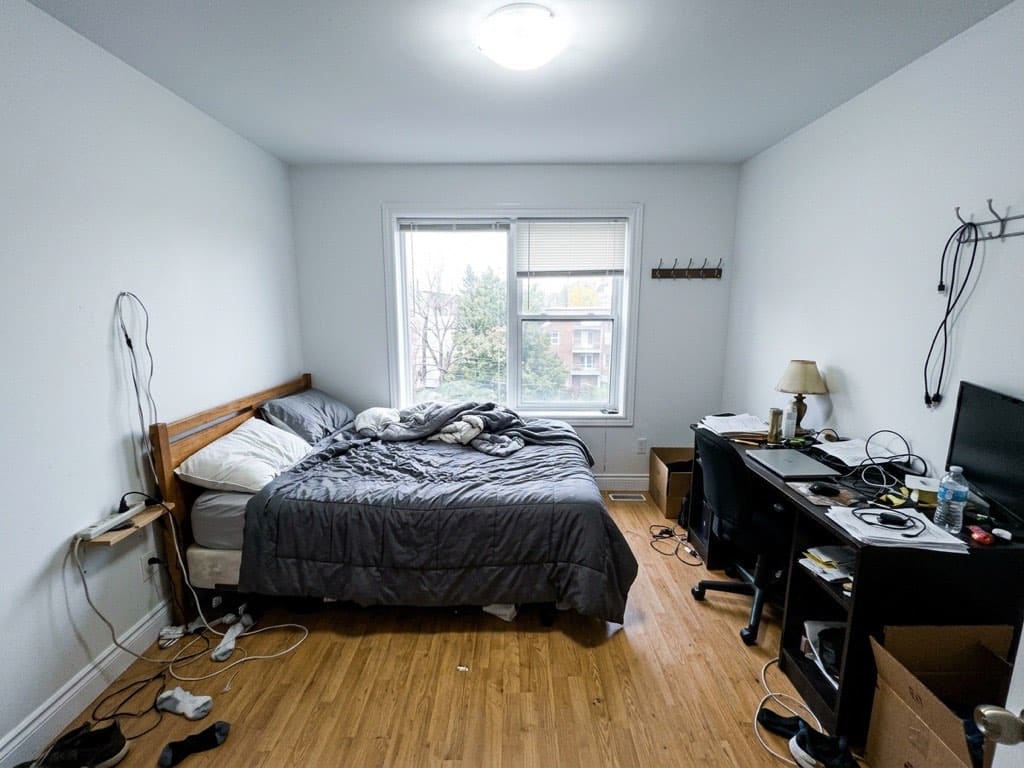
Japandi Calm bedroom transformation keeping window geometry fixed with low white-oak bed, oatmeal linen, and warm ceramic sconces
Original primary bedroom photo prior to testing bedroom restyling across top room design apps
Original BedroomJapandi Benchmark
Bedroom Design Test4:3 · 1024×768

Bedroom Makeover — Testing Bed Scale, Nightstands & Calming Lighting

Readers searching how do you design a bedroom usually struggle with headboard proportion, glare from overhead lights, and cramped walkways around the bed. The best room design apps test Japandi, Modern Nordic, and Warm Minimalist palettes on your real window wall before you buy furniture.

  • Confirms comfortable 75–90 cm bedside circulation and balanced lamp height next to the headboard
  • Compares soft matte limewash and oatmeal textiles against harsh original drywall glare
  • Works directly on Mac, Windows, iPhone, and Android browsers with zero desktop install
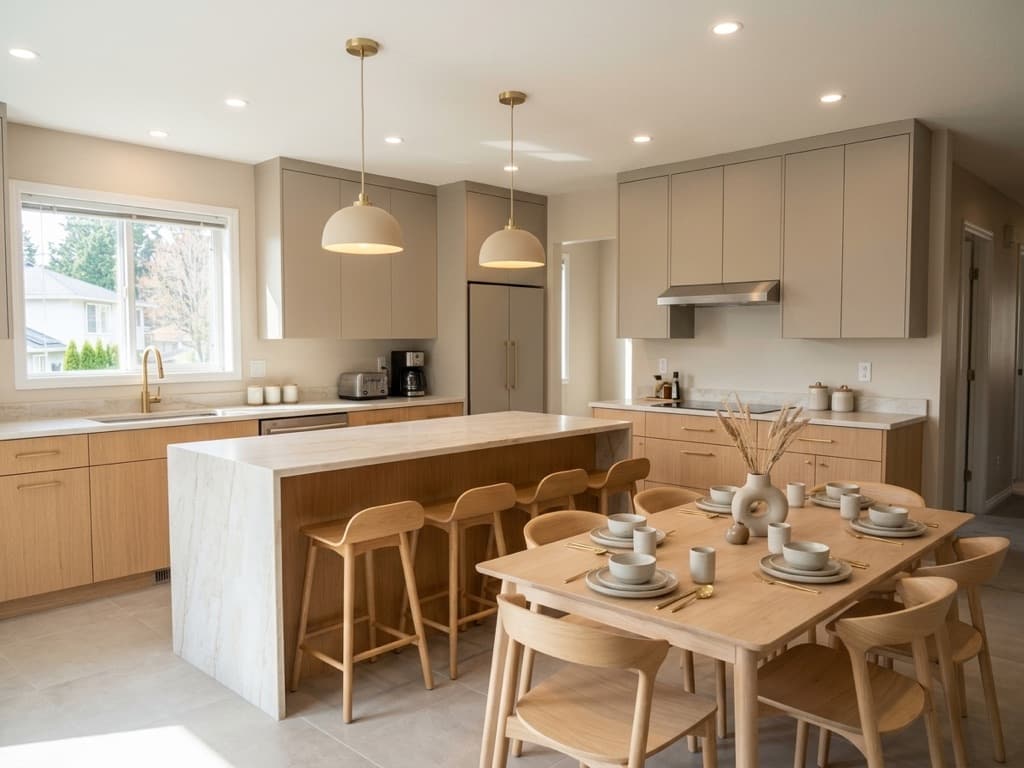
Modern Nordic kitchen restyle keeping exact cabinet footprint with alabaster and white-oak doors, honed stone counters, and brass hardware
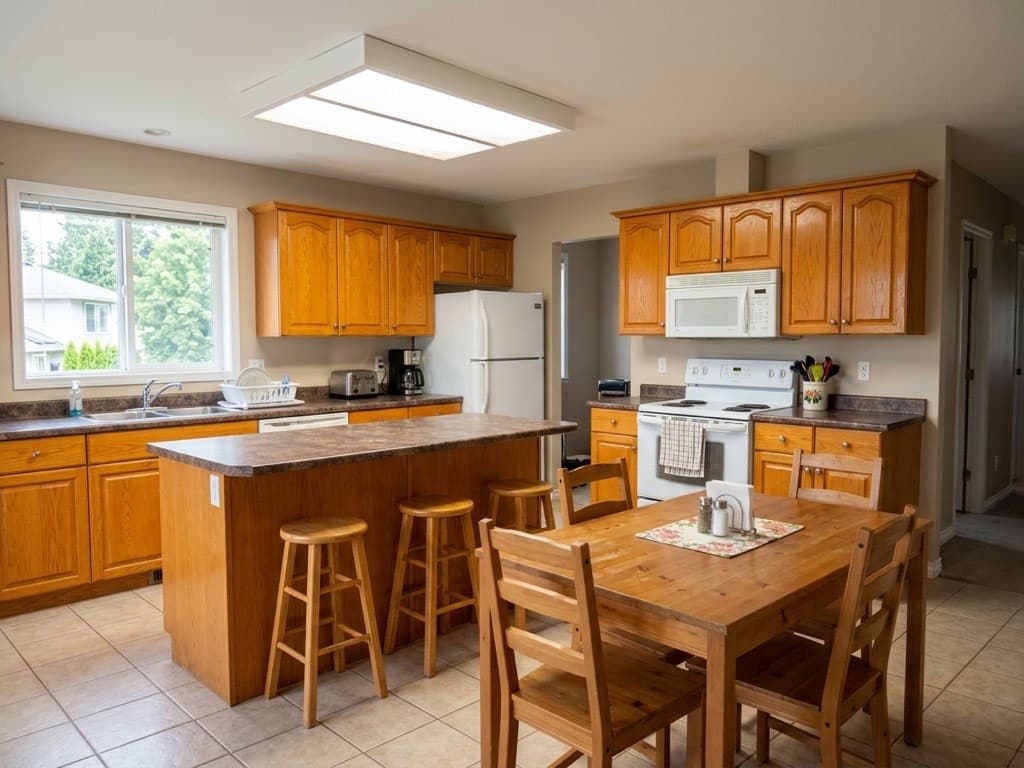
Dated residential kitchen before testing cabinetry and countertop upgrades in kitchen design apps
Dated KitchenFinish Upgrade
Kitchen Design Software Test4:3 · 1024×768

Kitchen Cabinetry & Countertops — AI Finish Previews vs. Cabinet Planners

Evaluating the best kitchen design software depends on whether you are re-facing cabinets in place or relocating plumbing. Browser AI tools instantly preview pale oak fronts, honed stone counters, and brass hardware on your real kitchen photo, while IKEA Kitchen Planner and Planner 5D handle box-by-box cabinet sizing.

  • Previews cabinet paint, wood veneer, backsplash tile, and quartz counters without moving plumbing
  • Pair photo-based AI finish concepts with dedicated online kitchen design tool cabinetry specs
  • Follows NKBA 105–120 cm (42–48 in) work-aisle clearance targets during remodel planning
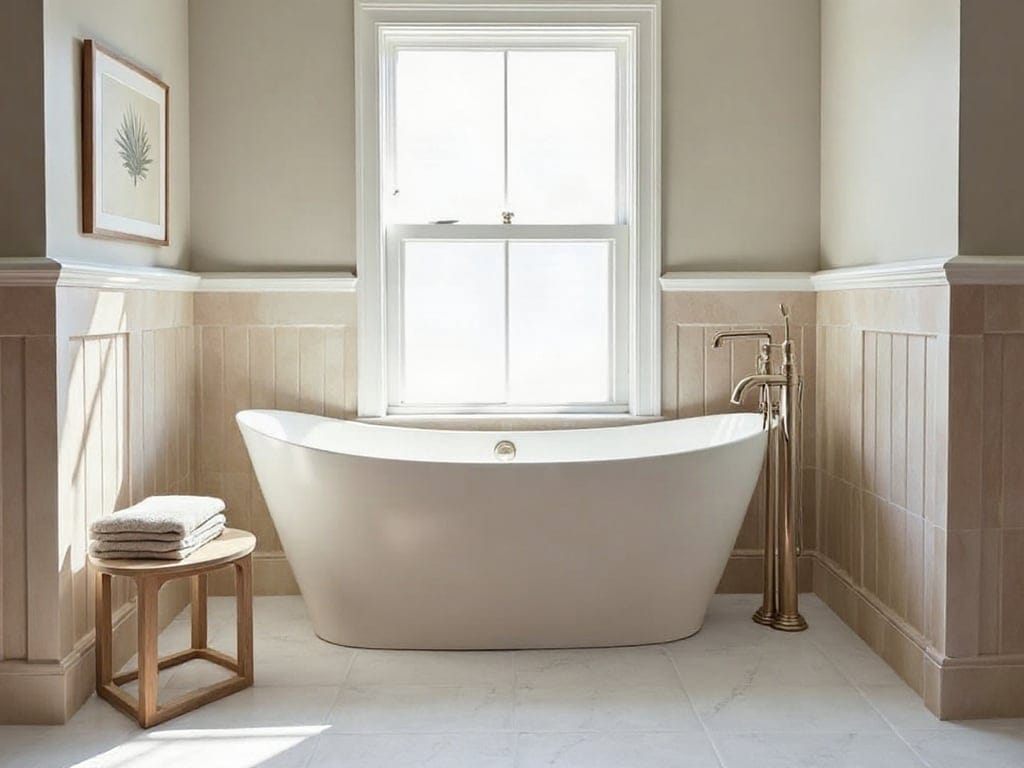
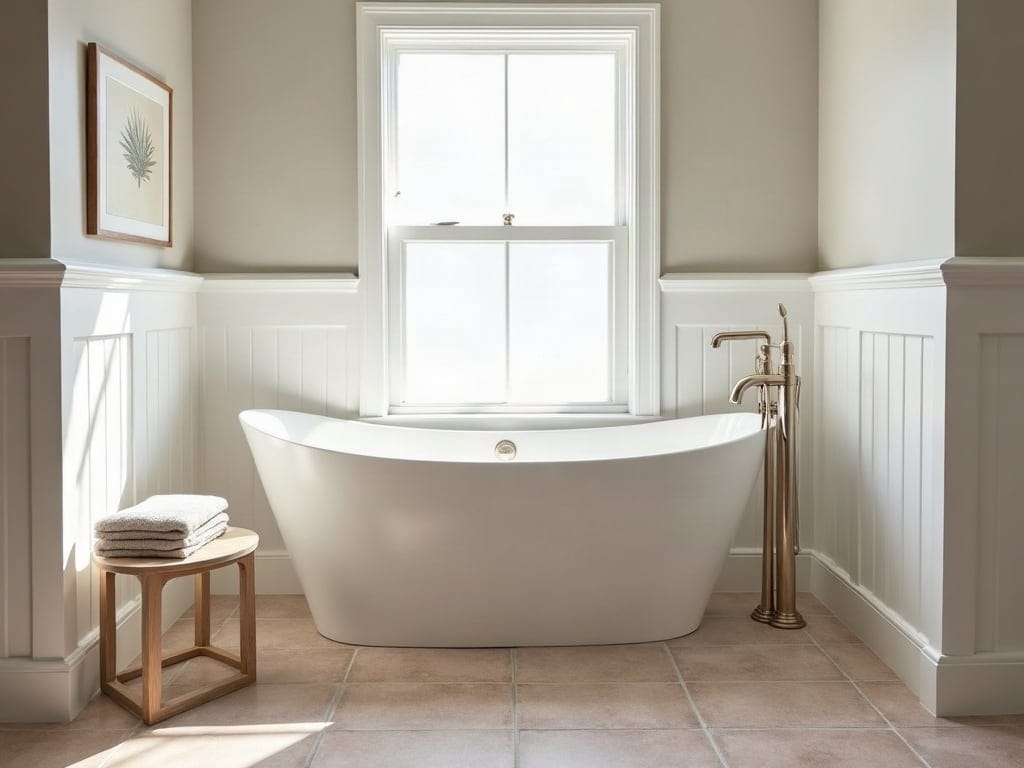
Updated bathroom visual benchmark featuring honed Carrara marble tile, warm fluted oak vanity, and soft 2700K sconces
Original bathroom photo before testing porcelain tile and vanity finish upgrades
Original BathCarrara & Oak
Bathroom Design App Test4:3 · 1024×768

Bathroom Tile & Vanity — Surface Visualizers vs. Full 3D Renderers

Tight bathrooms with mirrors, glass shower doors, and recessed niches trip up basic AI generators. The best bathroom design app combines exact surface masking for floor and wall tile patterns with depth-locked AI lighting for wet-room reflections and vanity finishes.

  • Tests 12×24 porcelain, herringbone mosaic, and fluted wood vanities while locking plumbing locations
  • Prevents wet-area grout and sheen guesswork before ordering heavy tile boxes
  • Pairs cleanly with RoomPoise's free browser tile visualizer for instant zero-login pattern swaps

How We Evaluated the Best Interior Design Apps in 2026

No affiliate rankings or vague feature checklists—every platform in our best interior design apps review was scored on three objective criteria that matter to real homeowners and designers.

CRITERION 01

Structural Lock & Spatial Realism (AI Interior Design vs. 3D Tools)

We tested whether each AI interior design app preserves actual window mullions, ceiling lines, and room depth—or whether 3D home design programs like Planner 5D, Homestyler, and Sweet Home 3D handle precise wall dimensions better.

CRITERION 02

True Free Tier Usability, Watermarks & Pricing Transparency

Many platforms advertise among the best interior design apps free yet lock every export behind a credit-card trial. We checked exact free-tier caps, watermark rules, Mac/Web/iOS compatibility, and real subscription tiers across all 10 tools.

CRITERION 03

Workflow Fit: Quick Restyling, Kitchens, LiDAR Scanning & Human Designers

No single program wins every task. We matched each tool honestly to its strongest job—photo restyling (RoomPoise), 3D layout building (Homestyler, Planner 5D), LiDAR room measuring (Magicplan), exterior measurements (Hover), and human styling (Spacejoy).

How Do I Design a Room Using the Best Interior Design Apps? (3 Steps)

Whether you are redesigning a living room or figuring out how do you design a bedroom from scratch, follow this proven 3-step workflow instead of bouncing randomly between tools.

  1. STEP 01

    Lock Dimensions & Capture a Daylight Corner Photo

    Measure your room walls, window sills, and doorway clearances first (or scan quickly with an iPhone LiDAR app like Magicplan). Then shoot a straight-on corner photo in natural daylight at chest height to feed into a photo-based AI interior design app.

  2. STEP 02

    Explore Styles & Palettes in an AI Home Design App

    Run 3–5 rapid concept passes in our embedded try-on uploader to compare Modern Nordic, Japandi, Warm Minimalist, and Mid-Century palettes on your real walls. Apply the 60-30-10 color balance rule (60% dominant wall/floor base, 30% upholstery, 10% brass or dark accents).

  3. STEP 03

    Verify Clearances & Surface Swatches Before Buying

    Once you pick a visual direction, confirm 90 cm (36 in) walkways and 40–45 cm coffee-table reach in a 3D room planner app or surface visualizer, then order physical fabric, tile, or paint samples to verify color under your real evening lamps.

Best Interior Design Apps vs. 3D Home Design Software: Honest Trade-Offs

Choose Photo-Based Best Interior Design Apps When You Need:

  • Instant 15-second visual concepts directly on your real room photo with zero 3D modeling learning curve—ideal for beginners and Mac/mobile browser users
  • Realistic lighting, material sheen, drapery folds, and color harmony tests across living rooms, bedrooms, kitchens, bathrooms, and exterior siding
  • Fast side-by-side style exploration (Modern Nordic vs. Japandi vs. Mid-Century) before investing hours into manual 3D furniture placement
  • Zero-login free browser surface visualizers for wall paint, bathroom tile grids, wallpaper murals, and exterior siding palettes

Choose 3D Home Design Software or Specialized Apps When You Need:

  • Exact millimeter-accurate cabinetry elevations, electrical outlet schedules, and custom millwork cut lists (use IKEA Kitchen Planner, SketchUp, or Chief Architect)
  • Interactive 3D walkthroughs where you manually drag specific retail SKU dimensions room by room (use Homestyler, Planner 5D, or Sweet Home 3D alternatives)
  • Contractor-grade LiDAR room measurements and jobsite material takeoffs (use Magicplan for interiors or Hover for exterior roof and siding square footage)
  • Dedicated human interior designer consultations with curated retail shopping carts and multi-round revisions (use Spacejoy or Havenly)

2026 Deep-Dive Reviews: Best AI for Interior Design, 3D Planners & Competitor Breakdowns

Sorting through dozens of best interior design apps gets confusing fast because three completely different software categories share the same search results: photo-based AI room restylers, manual 3D home design software, and contractor measurement utilities. Comparing them apples-to-apples starts by separating what each tool actually builds.

Among photo-based AI interior design apps, RoomPoise leads on structural depth locking and transparent browser workflows—pairing 5 instant no-login sample spaces and 40 starter credits with dedicated free browser visualizers for paint, tile, wallpaper, and exterior siding. In our Home Design AI review (HomeDesignsAI), the tool offers a huge catalog of creative style filters and exterior modes, though aggressive re-renders can occasionally drift window frames or alter ceiling planes on complex angles, and paid seats require an active recurring plan.

In our ReRoom AI review and Renovate AI reviews, both deliver quick stylized snapshots from smartphone photos for rapid brainstorming, yet free tiers restrict resolution or add watermarks and offer less granular architectural control over 4K lighting and material fidelity. If you prefer human designers over software, Spacejoy reviews consistently praise its 3D photoreal boards and shoppable retail links—just expect multi-day turnaround and per-room design fees rather than 15-second instant iterations.

For manual 3D room planner app workflows and desktop home design programs on Mac and Windows, Planner 5D and Homestyler stand out as the most approachable Sweet Home 3D alternatives for beginners, offering browser-based 3D drag-and-drop catalogs without clunky 2000s UI. Meanwhile, Magicplan reviews highlight unmatched iOS LiDAR room scanning and contractor estimating (though minimal style visualization), and for exterior remodeling pros comparing Hover pricing vs. EagleView, Hover charges per-property 3D photo measurement tiers suited to siding and window contractors while EagleView specializes in high-altitude aerial roof reports.

Best AI Interior Design App Overall — RoomPoise
Web + Mobile (Mac/Windows/iOS/Android). Depth-locked photo restyling in 15s, native 4K UHD exports, plus 100% free browser paint, tile, wallpaper & siding visualizers.
Best 3D Home Design Software for Beginners — Planner 5D & Homestyler
Browser, Mac, Windows & iOS. Ideal Sweet Home 3D alternatives when you want to build walls manually and drop scaled 3D furniture pieces from brand catalogs.
Best Kitchen Design Software Free — IKEA Kitchen Planner & RoomSketcher
Browser-based cabinetry layout, appliance clearance checks, and live itemized cabinet pricing for full kitchen remodels.
Best LiDAR & Exterior Measurement Apps — Magicplan & Hover
Magicplan excels at rapid interior LiDAR dimension capture and contractor estimates; Hover delivers 3D exterior siding and roof measurements (priced per project).

Best Kitchen Design Software, Bathroom Design Apps & Mac Interior Programs

Kitchens and bathrooms carry the highest renovation budgets per square foot, which is why choosing the right best kitchen design software or best bathroom design app matters more than picking a trendy filter. Start every kitchen remodel by verifying functional work clearances before falling in love with cabinet colors: the National Kitchen & Bath Association (NKBA) recommends at least 105 cm (42 in) for a one-cook work aisle and 120 cm (48 in) for multi-cook kitchens, plus landing zones beside sinks and ranges.

For cabinet box placement and itemized quotes, free browser planners like IKEA Kitchen Planner or SketchUp Free (one of the strongest best interior design software for Mac options alongside browser-native studios) give exact millimeter elevations. Once your cabinet footprint is locked, drop a photo of the kitchen or bathroom into a photo-based AI interior design tool or tile visualizer to test oak vs. painted fronts, stone countertops, and 12×24 porcelain layouts under realistic lighting.

Mac users specifically looking for the best home design software for Mac should prioritize WebGL and cloud-rendered browser platforms (RoomPoise, Homestyler, Planner 5D, SketchUp Web) over legacy Windows-only desktop installers, ensuring full Apple Silicon performance with zero local GPU overheating.

“Kitchen and bathroom planning guidelines establish minimum walkway widths, appliance clearances, and work-aisle dimensions—such as 42 inches for single-cook and 48 inches for multi-cook kitchens—to ensure safe, functional residential spaces.”

How Do I Design a Room or Bedroom? Proven Spatial & Lighting Rules Any App Needs

Even the best interior design apps only amplify the design fundamentals you feed them. Whether you are planning a compact guest bedroom or an open living lounge, anchoring your room around three architectural principles produces cohesive results on the very first pass.

First, respect circulation and focal hierarchy. In a living room, aim seating toward one primary focal wall (fireplace, window view, or media console) with 90 cm walking lanes and an 8×10 or 9×12 ft rug linking front furniture legs. When asking how do you design a bedroom, center the bed along the solid focal wall away from direct door swings, leave 75–90 cm on both sides where width allows, and keep nightstand tops roughly level with the mattress.

Second, design in three lighting layers rather than one overhead dome fixture. Pair daylight control (sheer linen drapery) with warm 2700K–3000K bedside sconces, shaded table lamps, and dimmable ambient lighting so matte wall paint, wood grain, and woven textiles read rich after dark instead of flat.

“Layered residential lighting—combining ambient illumination, localized task lighting, and warm accent light—enhances visual comfort, material texture, and spatial depth across living rooms and bedrooms.”

Best Free Interior Design Apps vs. Paid Subscriptions: Reading the Fine Print

Searching for the best AI room design free or best interior design apps free often leads to frustrating "free download" platforms that require a $40+ annual subscription before exporting a single image. Before investing time uploading photos into any of the best interior design apps, check three pricing rules: whether browser try-ons work without a credit card, whether exports carry watermarks, and whether paid credits roll over.

RoomPoise separates zero-cost browser utilities from GPU rendering transparently: our paint, tile, wallpaper, and exterior siding visualizers run 100% free in your browser with watermark-free PNG downloads and zero login, while our AI Room Design Studio offers 5 no-login interactive sample rooms plus 40 starter credits on Google sign-in (valid 7 days, no credit card required) for 2 custom 1080p renders. Every visitor can test our 5 built-in sample spaces instantly in the browser without logging in, and new Google accounts receive 40 welcome credits (2 custom 1080p renders, valid 7 days, no card required). Standard 1080p renders cost 20 credits per image, while 4K UHD architectural exports use 40 credits on paid tiers. Studio memberships start at $20/month billed annually ($240/year on Starter, or $25/month billed monthly), $40/month billed annually ($480/year on Pro), and $60/month billed annually ($720/year on Studio).

10 Best Interior Design Apps & Home Design Software — 2026 Comparison Matrix

Side-by-side breakdown of category fit, free-tier reality, Mac/Web/iOS support, engine type, and honest trade-offs across the 10 most searched platforms.

2026 data-backed comparison of the 10 best interior design apps: RoomPoise, Planner 5D, Homestyler, HomeDesignsAI, ReRoom AI, Renovate AI, IKEA Kitchen Planner, Magicplan, Spacejoy, and Hover
App / SoftwareBest ForFree Tier & PricingPlatformsEngine & Honest Trade-Off
1. RoomPoiseBest AI Interior Design App (Photo-Locked Restyling & 4K)Free Tools + 40 crWeb · Mac · iOS · WinDepth-locked photo AI + free browser paint/tile/siding/wallpaper visualizers; not a CAD cut-list drafter
2. Planner 5DBest Room Planner App & Beginner 3D Home Design SoftwareFreemium (~$10–$20/mo)Web · Mac · Win · iOSEasy drag-and-drop 2D/3D room building; full furniture catalog and HD renders require paid tier
3. HomestylerBest Free 3D Interior Design Software & Sweet Home 3D AltFree 1K · Pro ~$5–$20/moWeb · iOS · AndroidStrong cloud 3D rendering and real brand models; steeper learning curve than 15-second photo AI
4. HomeDesignsAIFast Multi-Style AI Redesigns (Home Design AI Review)Paid (~$27+/mo)Web BrowserWide creative style library and exterior modes; aggressive filters can shift window/wall proportions
5. ReRoom AIQuick Concept Brainstorming (ReRoom AI Review)Limited Free · PaidWeb · Mobile WebFast mobile-friendly concept renders; tighter free limits and less architectural 4K texture control
6. Renovate AIInterior & Exterior Remodel Previews (Renovate AI Reviews)Trial · Paid PlansWeb · iOS · AndroidConvenient photo upload presets for kitchens and facades; frequent paywall prompts on full exports
7. IKEA Kitchen PlannerBest Free Online Kitchen Design Tool & Cabinet Sizing100% FreeWeb · Mac · WinExact cabinet dimensions and instant parts pricing; limited exclusively to IKEA cabinet catalogs
8. MagicplanBest LiDAR Room Scanning & Estimates (Magicplan Reviews)2 Free Projects · PaidiOS · AndroidFast iPhone LiDAR measurement capture for contractors; not designed for photoreal style visualization
9. SpacejoyHuman-Assisted Online Interior Design (Spacejoy Reviews)Per-Room Fee ($49+)Web · iOSReal human designers with shoppable retail links; multi-day turnaround vs. instant AI iteration
10. HoverExterior 3D Siding & Roof Measurements (Hover Pricing)Per-Property / ProiOS · Android · WebContractor-grade 3D exterior takeoffs (beats aerial-only EagleView on walls); overkill for DIY rooms

Transparent Interior Studio Plans

Cancel anytime · Unused credits roll over · Full commercial rights

Save $60/yr

Starter

Ideal for homeowners & apartment refreshes

$20/month$25/mo

Total $240 billed yearly

2,880 Fast Credits / Year (240 / mo)

Up to 144 room renders (1080p) or 72 in 4K UHD / yr

  • 240 fast-queue interior credits / mo (2,880 / yr)
  • All 8 architectural styles & 6 room types
  • Photo-to-Render structure lock & layout rearrange
  • Watermark-free 1080p & 4K UHD room exports
  • Unused credits roll over while subscribed
  • Private stealth room uploads (hidden from gallery)
  • Full commercial rights for staging & client decks
  • Cancel anytime in one click

Credit Metering Schedule

1080p Photo Room Redesign20 cr / restyle
Virtual Furniture Rearrangement20 cr / layout
Empty Room Virtual Staging20 cr / stage
4K UHD Architectural Upscale40 cr / export
Save $120/yr
For Designers

Pro

Designed for interior designers & multi-room projects

$40/month$50/mo

Total $480 billed yearly

5,760 Fast Credits / Year (480 / mo)

Up to 288 room renders (1080p) or 144 in 4K UHD / yr

  • 480 priority fast-lane GPU credits / mo (5,760 / yr)
  • 4× parallel room style & layout batch comparisons
  • 4K UHD material & lighting micro-texture rendering
  • All 5 architectural aspect ratios (4:3 to 16:9)
  • Automatic rollover of unused monthly/annual credits
  • Private client workspace & zero watermarks
  • Full commercial freelance & client-deck license
  • Priority email support (hello@roompoise.com)

Credit Metering Schedule

1080p Photo Room Redesign20 cr / restyle
Virtual Furniture Rearrangement20 cr / layout
Empty Room Virtual Staging20 cr / stage
4K UHD Architectural Upscale40 cr / export

Need multi-seat agency or brokerage billing? Email hello@roompoise.com

Best Interior Design Apps & AI Home Design Software FAQs

What is the best AI for interior design if I want to upload a photo of my own room?

For uploading a real smartphone photo and keeping windows, walls, and fireplaces locked in place, RoomPoise is the strongest photo-based AI interior design app—combining 15-second depth-conditioned restyling and 4K UHD exports with 100% free browser visualizers for paint, tile, wallpaper, and exterior siding.

What are the best free interior design apps with no credit card required?

For instant browser surface testing (wall paint, bathroom tile grids, wallpaper murals, and exterior house siding), RoomPoise's client-side tools are 100% free with zero login and zero watermarks. For manual 3D modeling, Homestyler (free 1K renders), IKEA Kitchen Planner (free cabinetry), and Sweet Home 3D (open-source desktop) offer genuine no-card tiers.

What is the best home design software for Mac users in 2026?

Modern browser-native platforms deliver the smoothest experience on Apple Silicon Macs without heavy local installs. Pair RoomPoise (for instant photo-locked AI restyling and 4K mood boards) with Homestyler, Planner 5D, or SketchUp Web whenever you need manual 3D wall and furniture placement.

How do HomeDesignsAI, ReRoom AI, and Renovate AI compare among the best interior design apps?

All four rank among popular AI interior design apps for rapid photo restyling. HomeDesignsAI offers broad style filters but can occasionally drift window or ceiling geometry; ReRoom AI and Renovate AI focus on quick mobile concepts with tighter free-tier export limits. RoomPoise focuses on architectural depth locking, 2700K lighting realism, 4K UHD exports, and zero-login browser visualizers.

What is the difference between Hover and EagleView for exterior home projects?

Both serve exterior remodeling contractors rather than DIY interior styling. Hover builds a 3D exterior model from smartphone photos—giving precise wall, window, siding, and roof measurements priced per property—while EagleView relies on aerial imagery primarily for high-speed roofing reports.

What is the best kitchen design software or bathroom design app for beginners?

Start by testing finishes (oak vs. painted cabinets, stone counters, porcelain bathroom tile) on a photo of your real space inside RoomPoise's AI studio and free Tile Visualizer. If you are moving cabinets or plumbing, pair those finish boards with IKEA Kitchen Planner or Planner 5D to verify NKBA 42–48 inch aisle clearances.

How much does RoomPoise cost if I upgrade beyond the free tools and starter credits?

You can explore all 5 interactive sample transformations right away with no sign-up, and new Google accounts receive 40 welcome credits (valid 7 days, no card required) covering 2 custom 1080p renders at 20 credits each (40 credits for 4K UHD). For watermark-free 4K commercial downloads, multi-batch comparisons, and private uploads, plans start at $20/month ($240/year, or $25/month monthly) on Starter, $40/month ($480/year) on Pro, and $60/month ($720/year) on Studio.

Try Photo-Locked AI Interior Design on Your Own Room Now

Scroll up to the embedded try-on room uploader to test 5 benchmark rooms with zero login, or sign in with Google for 40 starter credits to redesign your own room photo in 15 seconds.

More Interior AI Studios & Specialized Planners

AI Room Design Studio

Redesign any room from a photo with free AI room design online. Test layouts, rearrange furniture, and preview 20+ interior styles—no sign-up.

Open Tool

Room Designer

Plan a room designer layout from a photo in a free room designer and 3D room design app. Restyle lounges, bedrooms, or game rooms instantly.

Open Tool

Interior Design App

Upload a room photo to our free AI interior design app and browser interior design software. Restyle kitchens, baths, or bedrooms in 15 sec.

Open Tool

AI Living Room Design

Transform your lounge with AI living room design from any photo. Keep walls, windows, and fireplaces locked while testing sofas, rugs, and styles.

Open Tool

Furniture Visualizer

Preview sofas, dining tables, and beds in your room photo with an AI furniture visualizer online. Test scale, layout, and lighting in seconds.

Open Tool

Paint Visualizer

Free AI paint color visualizer & interior paint simulator. Upload a photo to try wall colors, color match paint from photo, and test shades.

Open Tool

Virtual Staging

Fast MLS virtual staging and virtual house staging online in 15s. Furnish vacant rooms, erase clutter, or turn day exteriors into 4K twilight.

Open Tool

Tile Visualizer

Try our free online tile visualizer and bathroom tile visualizer. Upload a photo to preview floor tiles, tile layout patterns, and grout live.

Open Tool

Siding Visualizer

Free house siding visualizer and brick visualizer online. Upload a house photo to simulate vinyl siding, metal roof, and exterior color combos.

Open Tool

Wallpaper Visualizer

Visualize wallpaper and test murals in your room with a wallpaper visualizer free online. Upload a photo for botanical, grasscloth, and wall art.

Open Tool

Exterior Paint Visualizer

Preview house siding, brick, and trim with our free exterior paint visualizer or exterior paint color visualizer. Upload a house photo online.

Open Tool

Room Planner

Plan your room with our free online room planner tool and 3D room planner. Upload a photo to test furniture layouts and walkways—no download.

Open Tool