Free Online Paint Visualizer & Room Wall Color Match From Photo

Upload a photo of your room to test realistic wall paint colors, matte-to-satin finishes, and natural window shadows before buying gallons of paint. Our free home paint visualizer and paint color visualizer lets you click any wall to repaint with zero sign-up, color match paint from a photo with exact LRV and undertone readouts, or switch to our AI paint visualizer for global light bounce.

100% Free Tab
Instant wall paint & PNG — no login
Photo Match
Eyedropper HEX, LRV & ΔE swatches
24 Swatches
Matte, eggshell & satin sheen preview
AI 4K Mode
2 welcome 1080p renders on sign-in
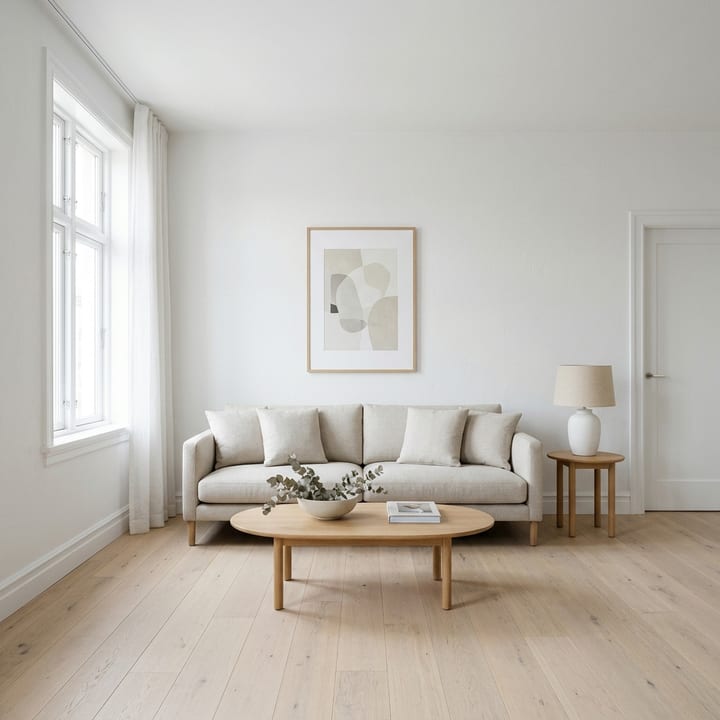
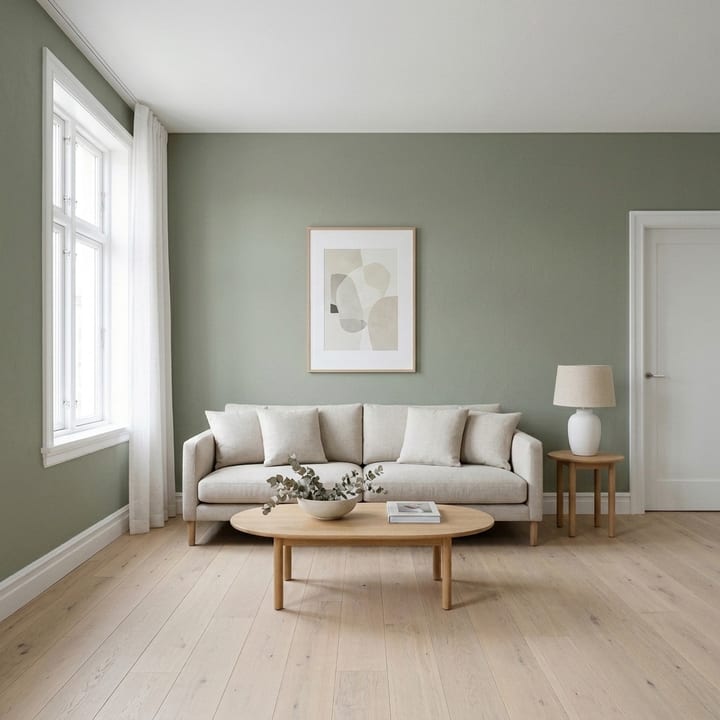
Paint visualizer output preserving every furniture piece and oak floor plank while repainting the walls in matte Warm Sage-Olive (#7C8674) with realistic natural shadows
Original sunlit living room photograph with stark builder-white walls, oatmeal linen sofa, light-oak coffee table, framed print, and white-oak floorboards
Before · Builder WhiteAfter · Warm Sage-Olive

Drag the divider: sofa, framed art, ceramic lamp, white baseboards, and oak floor planks stay locked while wall paint shifts cleanly under real window light.

Interactive Paint Color Visualizer & Photo Color Matcher

Use Tab 1 (Free · PNG) in this interior paint visualizer to upload a photo, click walls to test 24 architectural swatches, or color match paint from a photo—then switch to Tab 2 for the AI paint visualizer.

1. Room PhotoSample Loaded
2. Paint Color & SwatchWarm Sage-Olive · #7C8674 · LRV 24%
3. Interactive Wall Mask & Color Match0% painted
Room Lighting
Click any wall section to repaint with preserved natural shadows
BEFOREWARM SAGE-OLIVE · MATTE
50%

Runs 100% locally in your browser with zero sign-up and zero watermark. Click multiple wall sections to build a complete room mask, switch to Color Match to sample paint shades from any photo, or open AI Render for full indirect bounce lighting and exterior siding.

Real-World Paint Color Visualizer & Home Paint Visualizer Studies

Inspect how an interior paint visualizer and home paint visualizer resolve cold undertones, test moody bedroom walls, color match paint from a photo, and modernize house siding before opening a paint can.

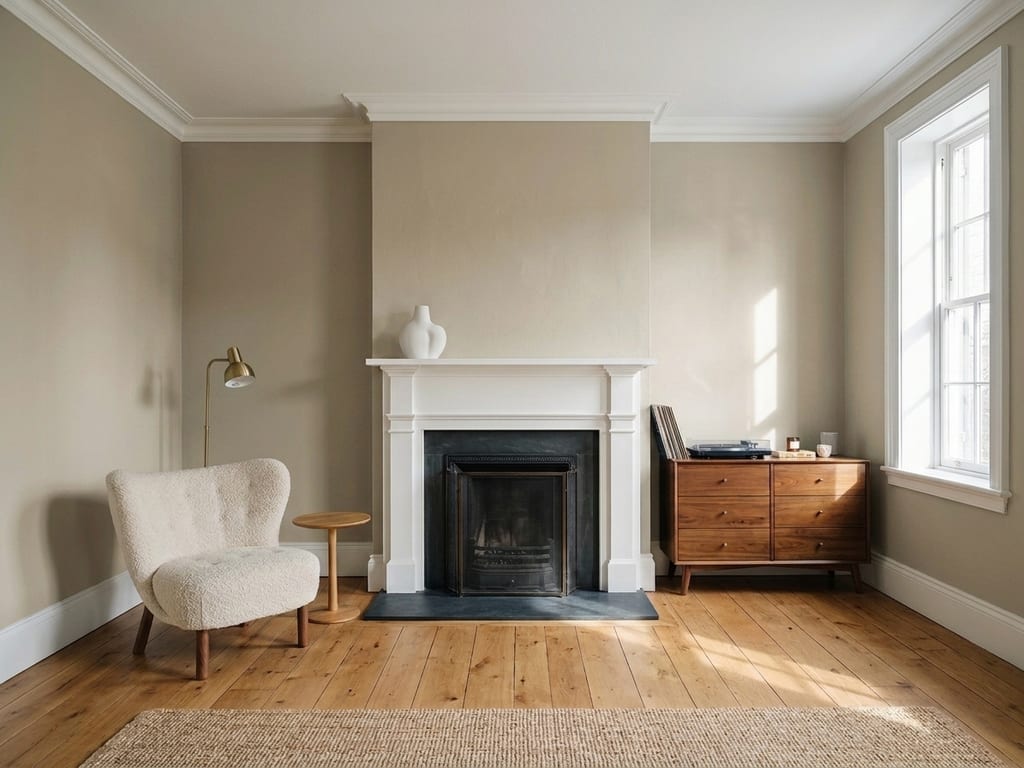
Interior paint color visualizer preview showing warm matte Travertine Greige walls harmonizing with the white fireplace and oak flooring
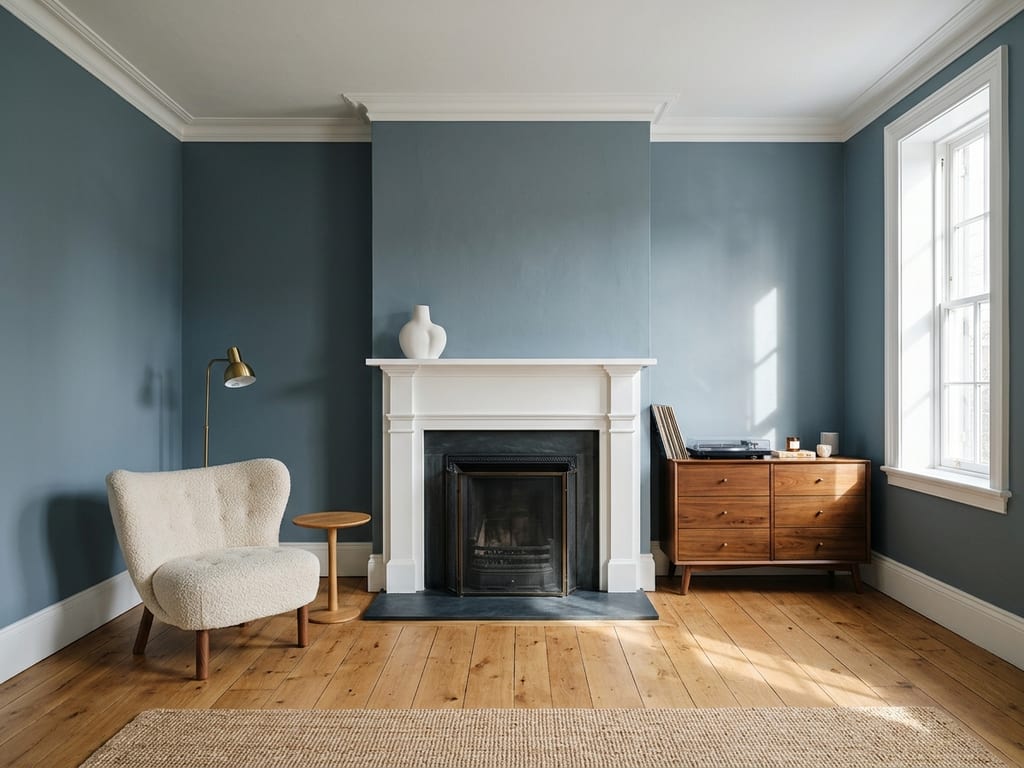
Sunlit living room with dated cold blue-gray painted walls, white fireplace mantel, cream armchair, walnut console, and warm oak floor
Cold Blue-GrayTravertine Greige
Interior Paint Visualizer4:3 · 1024×768

Cold Blue-Gray Living Room → Sunlit Travertine Greige Matte Walls

Cool blue-gray paint frequently clashes with warm white-oak planks and walnut consoles, leaving north-facing lounges looking dim. Previewing Travertine Greige (LRV 57%) inside our interior paint visualizer shows immediately how warming the wall undertone ties together white fireplace trim and hardwood flooring.

  • Preserves white fireplace mantel, crown molding, bouclé armchair, and walnut media cabinet
  • Shifts cool blue-gray walls into a balanced warm neutral without repainting white trim
  • Maintains authentic diagonal window sunbeams and plaster corner shadow gradients
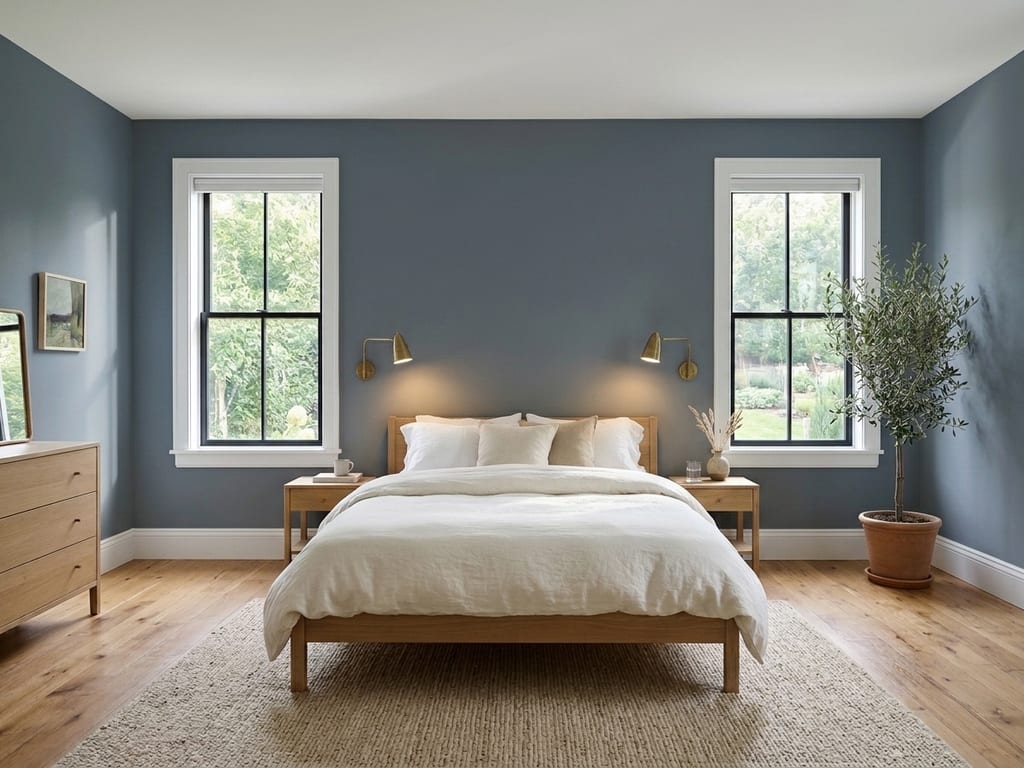
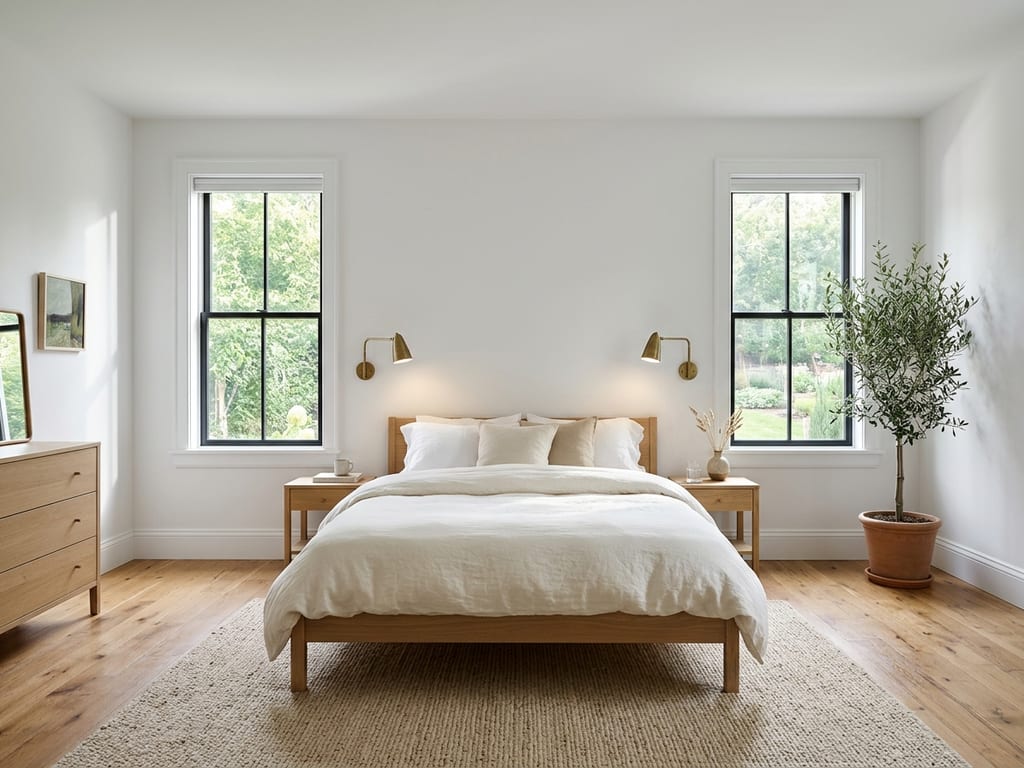
Bedroom paint visualizer result showing restful Architectural Slate-Blue eggshell walls framing the white window trim and warm brass sconces
Primary bedroom with stark plain white walls, twin back windows, white-oak platform bed, brass sconces, and potted olive tree
Builder WhiteSlate-Blue Eggshell
Bedroom Paint Visualizer4:3 · 1024×768

Stark Builder-White Bedroom → Restful Architectural Slate-Blue Eggshell

Deep slate and charcoal bedroom walls feel risky until you preview shades alongside existing bedding and window casings. Running a photo through our interior paint visualizer and paint color visualizer confirms how a low-LRV (12%) Slate-Blue envelope frames white window trim and makes warm 2700K brass sconces glow.

  • Keeps the oak platform bed, ivory linen duvet, olive tree, and twin window casings untouched
  • Previews subtle eggshell light bounce around warm bedside wall sconces
  • Helps balance dark wall LRV against crisp white ceilings and pale wood floors
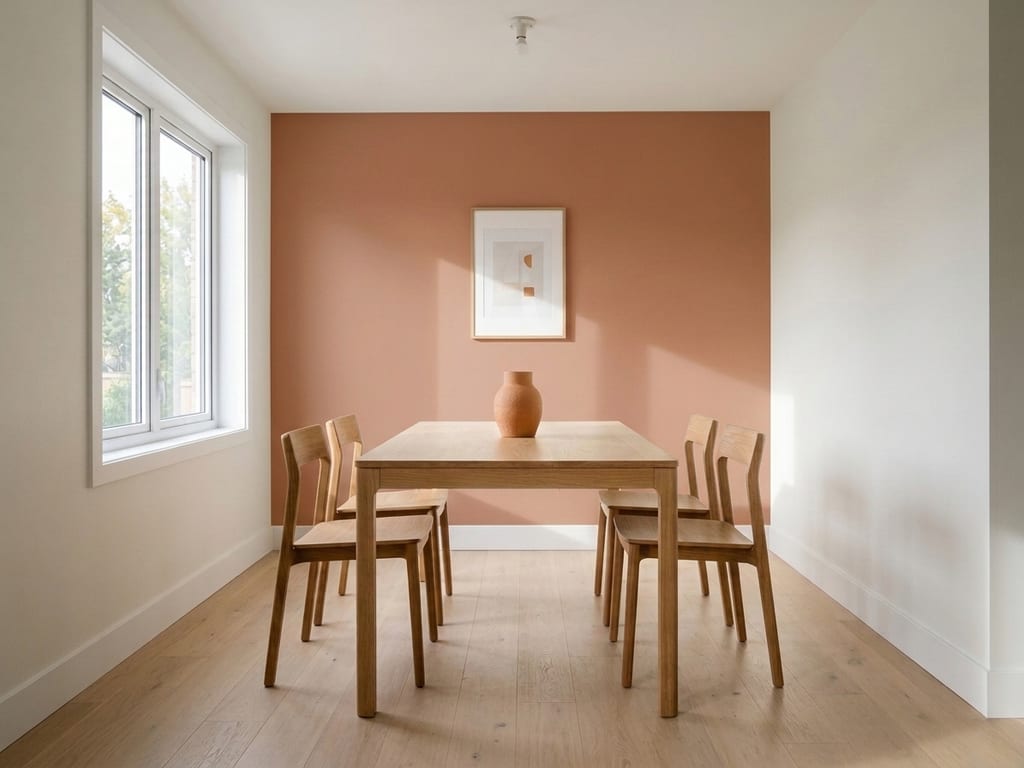
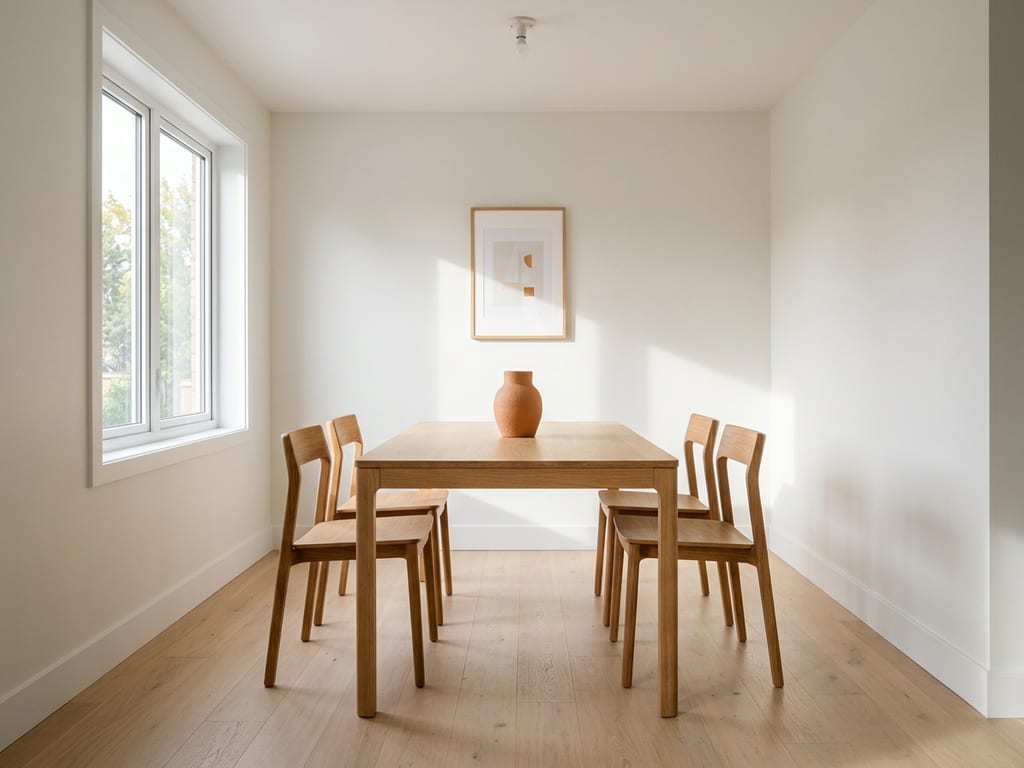
Color match paint visualizer preview painting only the rear dining accent wall in matte Muted Terracotta Clay matched to the ceramic vase
Sunlit dining nook with plain off-white walls, light-oak dining table, four chairs, framed print, and terracotta ceramic vase
Plain Off-WhiteMatched Terracotta
Color Match Paint From Photo4:3 · 1024×768

Off-White Dining Nook → Terracotta Accent Wall Matched to Ceramic Decor

When a favorite rug, curtain, or ceramic vessel inspires your room palette, you can color match paint from a photo online in seconds. Sampling the matte terracotta vase with our built-in eyedropper extracts its HEX, LRV, and undertone, then previews the matched Muted Terracotta Clay shade across the focal dining wall.

  • Samples exact pixel HEX, RGB, CIE LRV %, and warm/cool undertone from any uploaded photo
  • Ranks the closest architectural paint swatches by perceptual Delta-E (ΔE) distance
  • Tests single accent-wall contrast while keeping side walls and baseboards crisp off-white
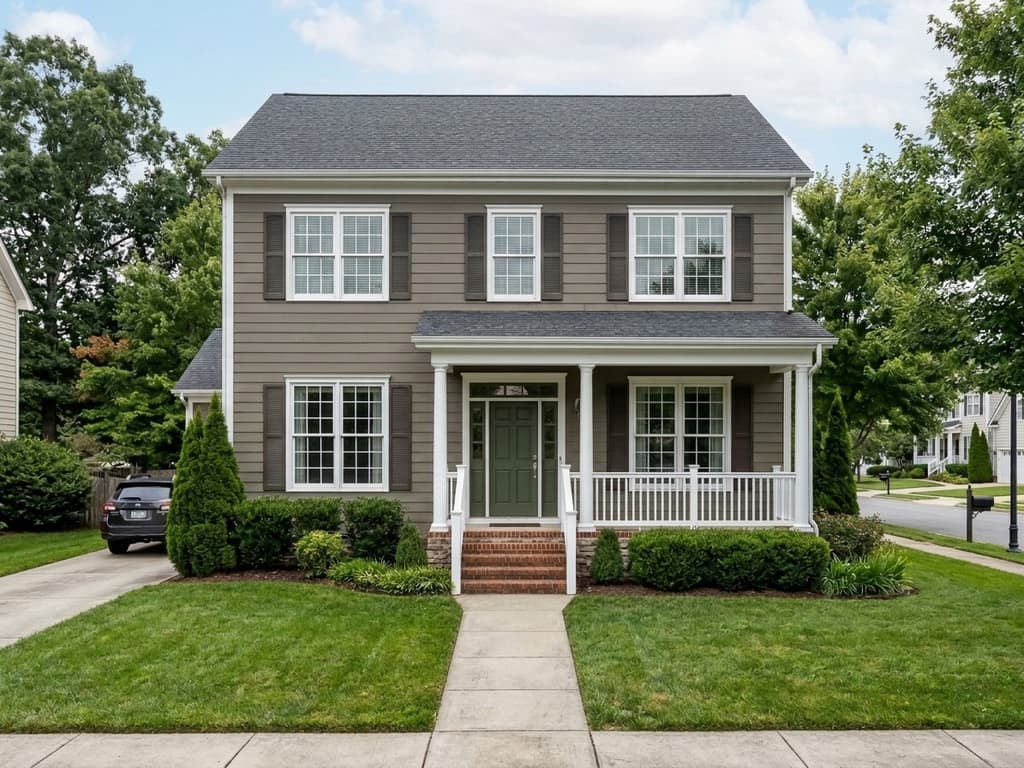
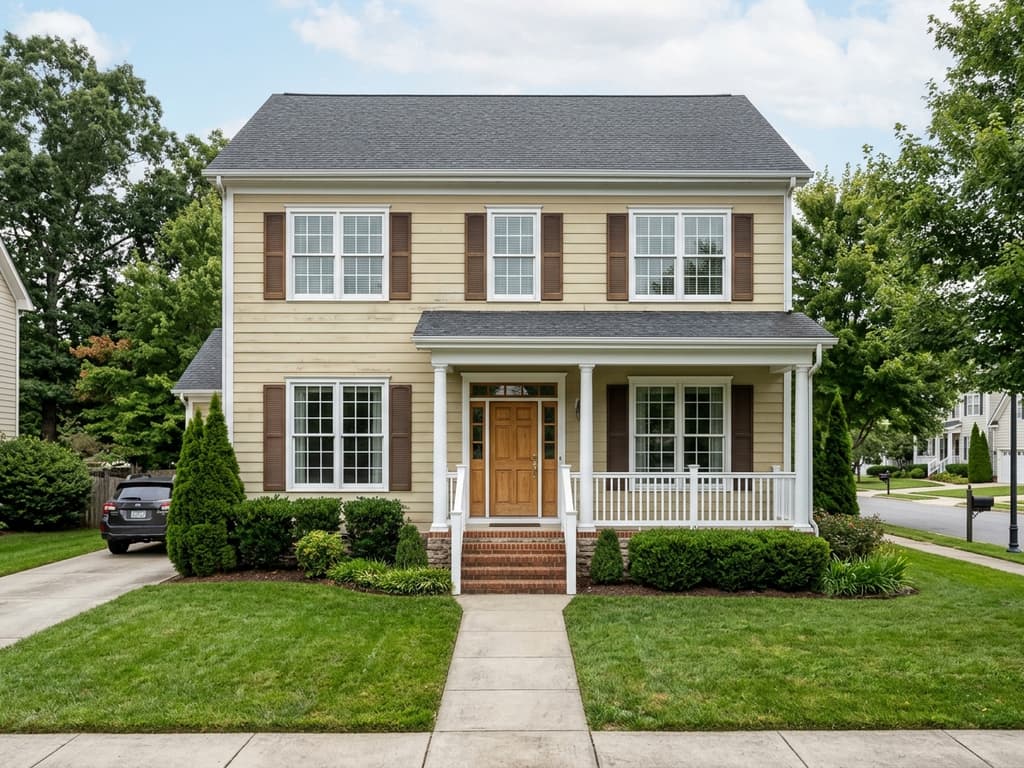
House paint visualizer preview transforming exterior siding to Warm Architectural Charcoal-Taupe with crisp Alabaster White trim and a Forest-Olive front door
Two-story suburban house exterior in morning daylight with faded yellow-beige horizontal siding, dark brown shutters, and white porch columns
Faded Beige SidingCharcoal & Olive
House Exterior Paint Simulator4:3 · 1024×768

Dated Yellow-Beige Siding → Charcoal-Taupe Body & Forest-Olive Entry Door

Repainting exterior siding is a multi-thousand-dollar commitment where small paper swatches look dramatically brighter in direct sun. Our AI paint visualizer and home paint visualizer let you preview exterior house siding—pairing Warm Charcoal-Taupe with crisp Alabaster trim and a muted Forest-Olive front door.

  • Locks two-story siding courses, shingle roof, porch columns, brick steps, lawn, and trees
  • Previews lower-LRV exterior siding tones that resist washing out in bright outdoor daylight
  • Coordinates body, shutter, white trim, and front entry door accent colors in one pass

Why Homeowners & Designers Choose This Paint Color Visualizer

Tiny paper paint chips never reveal how a color's Light Reflectance Value (LRV) and undertone behave across four walls under your real windows.

01 · ZERO-LOGIN FREE TAB

Instant Browser Interior Paint Visualizer & Photo Color Match

Unlike paywalled apps that lock basic previews behind a subscription, our free browser paint color visualizer runs 100% locally. Upload a room photo, click walls to test 24 curated swatches or custom HEX codes, color match paint from a photo via eyedropper, and export watermark-free PNGs with zero login.

02 · REAL SHADOWS & LRV

Luminance-Preserving Paint Color Visualizer With Sheen Controls

Flat solid overlays make rooms look cartoonish. Our interior paint visualizer preserves your original plaster micro-texture, window cast shadows, and ceiling gradients while simulating matte, eggshell, or satin sheen across 2700K warm evening, 4000K neutral, and 5500K north-facing daylight.

03 · AI PAINT MODE

One-Click Handoff to AI Paint Mode for Complex Surfaces

Need realistic indirect color bounce across white ceilings, textured limewash plaster, kitchen cabinetry, or whole-house exterior lap siding? Switch to Tab 2 inside our home paint visualizer using the exact same uploaded room photo—backed by 40 starter credits on sign-in.

How to Use This Home Paint Visualizer in 3 Steps

Upload a smartphone room photo, test interior or exterior wall colors with natural shadows, and compare options before buying physical paint samples.

  1. Step 01

    Upload a Room Photo or Load a Sample Space

    Drop a well-lit daytime JPEG, PNG, or WebP photo into the paint color visualizer—or click any of our 5 sample rooms (living room, fireplace lounge, bedroom, dining nook, or house exterior) with zero sign-up.

  2. Step 02

    Click Walls to Paint or Color Match Paint From Photo

    Use Click Wall inside the interior paint visualizer to mask wall zones automatically (fine-tuning trim with Brush or Erase), switch to Color Match to color match paint from a photo with exact HEX, LRV, and Delta-E swatches, and compare Matte, Eggshell, or Satin finishes.

  3. Step 03

    Download Free PNG or Switch to AI Mode

    Drag the live Before/After split slider to evaluate contrast against your flooring and furniture, click Download Free PNG instantly, or switch to the AI paint visualizer tab for depth-locked 1080p and 4K architectural outputs.

Free Canvas vs. AI Paint Visualizer — Capabilities & Limits

Ideal Workflows for RoomPoise Paint Color Visualizer

  • Narrowing 20+ interior wall paint colors down to 2–3 finalists before buying physical sample quarts or peel-and-stick sheets
  • Using the eyedropper to color match paint from a photo of a sofa, rug, curtain, ceramic vase, or magazine room for exact HEX, LRV %, undertone, and Delta-E swatch matches
  • Testing wall paint harmony against existing oak floorboards, brick fireplaces, kitchen cabinets, and natural window daylight
  • Previewing bold bedroom accent walls, moody slate-blue studies, and warm charcoal-taupe house exterior siding combinations
  • Exporting free watermark-free PNG wall comparisons in your browser or 4K UHD AI paint boards for design clients

Honest Technical Boundaries (Screen vs. Wet Paint)

  • Displays use backlit sRGB light rather than reflective physical pigments: always validate your top 2 finalists with real brush-outs or peel-and-stick samples in morning and evening room light before ordering 5-gallon buckets
  • Tab 1 (Free Browser Canvas) excels at rapid interior wall recoloring and photo color matching, while heavily shadowed brick, kitchen cabinets, or complex multi-story house siding produce cleaner light bounce in Tab 2 (AI Render)
  • Photo color matching reflects the white balance of the source photograph—images taken under strong yellow bulbs can skew sampled HEX warmer by 5–10 Delta-E units compared to neutral daylight photos
  • This virtual paint visualizer previews surface colors and architectural finishes rather than estimating exact gallon coverage formulas for raw porous drywall

Using LRV (Light Reflectance Value) & Undertones in a Paint Color Visualizer

Every architectural paint color carries two invisible technical properties that explain why a swatch looks crisp in a hardware aisle yet muddy at home: Light Reflectance Value (LRV) and hue undertone. LRV measures the percentage of visible light a painted wall reflects on a 0–100 scale, where 0% is absolute black and 100% is pure theoretical white.

Inside our interior paint visualizer and paint color visualizer, each of the 24 curated swatches and every eyedropper sample calculates real CIE relative luminance automatically. North-facing rooms with cool indirect daylight typically thrive on warm whites and neutrals in the 65–88% LRV range to prevent gray shadows, whereas bright south-facing living rooms easily support rich mid-tones (LRV 25–55%) and moody architectural slates (LRV 5–20%).

Whether you search for a US home paint visualizer or a UK paint colour visualiser, testing undertones side-by-side against your fixed oak floorboards, stone countertops, and drapery eliminates the most expensive repainting mistake: pairing yellow-beige floors with pink-undertone greige walls.

High-LRV Whites & Limewash (LRV 70–88%)
Maximizes daylight bounce in compact hallways, north-facing living rooms, and trim casings; keep a slight warm cream or limestone undertone so walls never read sterile.
Balanced Mid-Tone Neutrals & Sages (LRV 25–64%)
Anchors open living rooms and dining alcoves with organic warmth—Travertine Greige (57%) and Warm Sage-Olive (24%) hold depth in bright afternoon sun without washing out.
Deep Architectural Accents (LRV 4–24%)
Ideal for primary bedrooms, study walls, and house exterior siding (Slate Blue 12%, Charcoal Taupe 10%, Forest Olive 7%); pair with crisp high-LRV white trim for contrast.

“Relative luminance in sRGB color spaces is defined by weighting linearized red, green, and blue channels (0.2126 R + 0.7152 G + 0.0722 B) to model human visual brightness perception.”

How to Color Match Paint From a Photo Online With CIE Delta-E Accuracy

When you already own a linen sofa, hand-knotted rug, or terracotta ceramic piece—or save an inspiring room screenshot—guessing a matching wall paint chip by eye often drifts several shades too saturated. Using our built-in eyedropper inside this paint color visualizer lets you click any pixel in an uploaded photograph to average a 5×5 patch, filter camera sensor noise, and extract its exact HEX, RGB, LRV %, and undertone family.

Behind the scenes, the matcher converts your sampled color from sRGB into the perceptually uniform CIE L*a*b* color space and ranks our architectural palette by CIE76 Delta-E (ΔE) distance. A ΔE under 2.0 appears nearly identical to the human eye; a ΔE between 2.0 and 5.0 signals a close architectural cousin that accounts for real-world lighting shifts.

For the most accurate paint color match from a photo, shoot your reference object near a window during midday with overhead yellow bulbs switched off, and avoid sampling directly inside glossy glare spots or deep corners.

Step 1 — Neutral Daylight Capture
Photograph the wall, fabric, or decor piece in diffused daytime light rather than under 2700K evening bulbs to prevent artificial amber color cast.
Step 2 — Sample Mid-Tone Planes
Click the evenly lit center of the target surface with the Color Match eyedropper so the 5×5 pixel average captures true pigment hue and LRV.
Step 3 — Test 1 Shade Lighter on Full Walls
Color intensifies across four full walls due to inter-reflection; compare both the exact sampled HEX and the next higher-LRV swatch in the split slider.

Choosing Matte, Eggshell, or Satin Sheen for Interior Rooms & House Exteriors

Two walls painted with the exact same pigment formula look noticeably different depending on specular sheen. Higher-gloss coatings reflect more directional window light, making colors appear slightly brighter and more washable while highlighting drywall tape seams and plaster texture.

In living rooms, primary bedrooms, and older plaster homes, matte or low-sheen eggshell hides minor surface ripples and creates a calm, velvet-like architectural backdrop. Kitchens, hallways, and bathroom trim benefit from scrubbable satin finishes, while exterior house siding performs best in low-luster satin or flat-acrylic exteriors rated for UV fade resistance.

Remember that outdoor sunlight is 50 to 100 times brighter than indoor illumination: when you use our home paint visualizer to preview siding on a house exterior, mid-tone taupes and olives often read two steps lighter outside than they appear on an indoor screen.

“Specular gloss measurements at 60-degree geometry provide a standardized numerical scale for comparing surface sheen across flat, eggshell, satin, and semi-gloss architectural coatings.”

Free Unlimited Browser Wall Painting vs. AI Paint Credits

RoomPoise separates zero-cost browser utilities from GPU-accelerated AI rendering cleanly and honestly. Tab 1 inside our paint color visualizer runs 100% locally on your device—meaning unlimited photo uploads, unlimited swatch tests, full HEX/LRV photo matching, and free watermark-free PNG downloads with zero sign-up and zero credits.

When you want full AI paint rendering (Tab 2) for complex global light bounce, textured limewash plaster, kitchen cabinetry refinishing, or exterior house siding, signing in with Google grants 40 starter credits valid for 7 days (no credit card required), covering 2 custom 1080p renders at 20 credits each. Every visitor can test our 5 built-in sample spaces instantly in the browser without logging in, and new Google accounts receive 40 welcome credits (2 custom 1080p renders, valid 7 days, no card required). Standard 1080p renders cost 20 credits per image, while 4K UHD architectural exports use 40 credits on paid tiers. Studio memberships start at $20/month billed annually ($240/year on Starter, or $25/month billed monthly), $40/month billed annually ($480/year on Pro), and $60/month billed annually ($720/year on Studio).

Room-by-Room Paint Visualizer LRV, Sheen & Surface Guide

Use these architectural benchmarks when selecting wall paint colors, gloss levels, and visualizer modes across interior rooms and house exteriors.

RoomPoise paint color visualizer recommended LRV range, 60-degree gloss sheen, studio mode, and lighting pairing across five residential surfaces
Room or SurfaceRecommended LRV RangeIdeal Paint Sheen (60° GU)Best Visualizer ModeLighting & Trim Pairing
Living Room WallsLRV 45–75% (Warm Greige, Linen, Soft Sage)Free Canvas or AI ModeMatte / Eggshell (5–20 GU)Test at both 2700K evening & 4000K daylight; pair with LRV 85%+ trim
Primary Bedroom WallsLRV 10–55% (Slate Blue, Sage-Olive, Limestone)Free Canvas or AI ModeMatte / Flat (2–10 GU)Low-glare matte softens bedside 2700K sconce pools and conceals wall seams
Dining Accent WallLRV 15–45% (Terracotta Clay, Deep Thyme)Color Match + CanvasMatte / Eggshell (8–20 GU)Sample a vase, rug, or art tone via Color Match eyedropper for cohesive depth
Kitchen Cabinets & TrimLRV 20–85% (Alabaster, Dry Thyme, Charcoal)AI Render (20 cr)Satin / Semi-Gloss (30–65 GU)AI mode handles paneled cabinet door bevels, hardware reflections & counters
House Exterior SidingLRV 8–45% (Charcoal-Taupe, Forest Olive)AI Render (20 cr)Exterior Flat / Satin (10–35 GU)Outdoor sun brightens paint 1–2 steps; keep porch columns & fascia crisp white

Transparent Interior Studio Plans

Cancel anytime · Unused credits roll over · Full commercial rights

Save $60/yr

Starter

Ideal for homeowners & apartment refreshes

$20/month$25/mo

Total $240 billed yearly

2,880 Fast Credits / Year (240 / mo)

Up to 144 room renders (1080p) or 72 in 4K UHD / yr

  • 240 fast-queue interior credits / mo (2,880 / yr)
  • All 8 architectural styles & 6 room types
  • Photo-to-Render structure lock & layout rearrange
  • Watermark-free 1080p & 4K UHD room exports
  • Unused credits roll over while subscribed
  • Private stealth room uploads (hidden from gallery)
  • Full commercial rights for staging & client decks
  • Cancel anytime in one click

Credit Metering Schedule

1080p Photo Room Redesign20 cr / restyle
Virtual Furniture Rearrangement20 cr / layout
Empty Room Virtual Staging20 cr / stage
4K UHD Architectural Upscale40 cr / export
Save $120/yr
For Designers

Pro

Designed for interior designers & multi-room projects

$40/month$50/mo

Total $480 billed yearly

5,760 Fast Credits / Year (480 / mo)

Up to 288 room renders (1080p) or 144 in 4K UHD / yr

  • 480 priority fast-lane GPU credits / mo (5,760 / yr)
  • 4× parallel room style & layout batch comparisons
  • 4K UHD material & lighting micro-texture rendering
  • All 5 architectural aspect ratios (4:3 to 16:9)
  • Automatic rollover of unused monthly/annual credits
  • Private client workspace & zero watermarks
  • Full commercial freelance & client-deck license
  • Priority email support (hello@roompoise.com)

Credit Metering Schedule

1080p Photo Room Redesign20 cr / restyle
Virtual Furniture Rearrangement20 cr / layout
Empty Room Virtual Staging20 cr / stage
4K UHD Architectural Upscale40 cr / export

Need multi-seat agency or brokerage billing? Email hello@roompoise.com

Paint Color Visualizer & Home Paint Visualizer Questions

Is this interior paint visualizer really free to upload my own room photo?

Yes. Tab 1 in our paint color visualizer runs 100% locally in your browser with zero sign-up, zero credit card, and zero watermarks—you can upload your own JPEG, PNG, or WebP room photo, click walls to test all 24 architectural swatches or custom HEX colors, color match paint from a photo, and download PNG results completely free.

How do I color match paint from a photo online using RoomPoise?

Upload your room or inspiration photo into the paint color visualizer, click the eyedropper tool in Step 3, and tap the surface you want to match. RoomPoise averages a 5×5 pixel area to filter noise and instantly returns the exact HEX, RGB, Light Reflectance Value (LRV %), warm/cool undertone classification, and the top 3 closest architectural swatches ranked by CIE Delta-E distance.

What is the difference between Tab 1 (Free Canvas) and Tab 2 (AI Mode)?

Tab 1 uses a real-time client-side luminance-preserving canvas engine—it is free, instant (< 15 ms), and ideal for testing dozens of interior wall colors and matching photos. Tab 2 (our AI paint visualizer) sends your photo to our depth-locked fal.ai model (20 credits at 1080p, 40 credits at 4K UHD) to recalculate indirect ceiling bounce light, limewash plaster texture, kitchen cabinetry, or exterior house siding.

Can I use this home paint visualizer on a house exterior as well as interior bedrooms?

Yes. You can test interior living rooms, bedrooms, dining accent walls, and two-story house exteriors. For multi-surface house exteriors with horizontal siding, shutters, porch columns, and brick steps, Tab 2 with the House Exterior Siding preset produces crisp architectural shadows under outdoor daylight.

How accurate are digital paint color visualizer previews compared to physical paint cans?

Our interior paint visualizer preserves your real wall shadows and lets you simulate 2700K, 4000K, and 5500K lighting, which narrows 20+ candidates down to 2–3 reliable finalists. Because backlit monitors differ from reflective physical pigments (metamerism), always confirm your final 2 shades with real peel-and-stick or pint samples in your room before buying full gallons.

How much does the AI paint visualizer cost if I want 4K UHD exports?

You can explore all 5 interactive sample transformations right away with no sign-up, and new Google accounts receive 40 welcome credits (valid 7 days, no card required) covering 2 custom 1080p renders at 20 credits each (40 credits for 4K UHD). For watermark-free 4K commercial downloads, multi-batch comparisons, and private uploads, plans start at $20/month ($240/year, or $25/month monthly) on Starter, $40/month ($480/year) on Pro, and $60/month ($720/year) on Studio.

Are my uploaded home photos kept private when I try paint colors?

Yes. In Tab 1 (Free Canvas), your photo never leaves your browser—all wall masking, recoloring, and PNG downloads execute locally on your device. In Tab 2, keep Private Visibility enabled so uploaded photos and 4K renders remain strictly inside your personal account workspace.

See Your Next Wall Paint Color in Real Room Light — Free Online

Upload a room photo to paint walls instantly in our home paint visualizer with zero login, color match paint from a photo, or claim 40 starter credits for AI 4K renders.

More Interior AI Studios & Specialized Planners

AI Room Design Studio

Redesign any room from a photo with free AI room design online. Test layouts, rearrange furniture, and preview 20+ interior styles—no sign-up.

Open Tool

Room Designer

Plan a room designer layout from a photo in a free room designer and 3D room design app. Restyle lounges, bedrooms, or game rooms instantly.

Open Tool

Interior Design App

Upload a room photo to our free AI interior design app and browser interior design software. Restyle kitchens, baths, or bedrooms in 15 sec.

Open Tool

AI Living Room Design

Transform your lounge with AI living room design from any photo. Keep walls, windows, and fireplaces locked while testing sofas, rugs, and styles.

Open Tool

Furniture Visualizer

Preview sofas, dining tables, and beds in your room photo with an AI furniture visualizer online. Test scale, layout, and lighting in seconds.

Open Tool

Virtual Staging

Fast MLS virtual staging and virtual house staging online in 15s. Furnish vacant rooms, erase clutter, or turn day exteriors into 4K twilight.

Open Tool

Tile Visualizer

Try our free online tile visualizer and bathroom tile visualizer. Upload a photo to preview floor tiles, tile layout patterns, and grout live.

Open Tool

Siding Visualizer

Free house siding visualizer and brick visualizer online. Upload a house photo to simulate vinyl siding, metal roof, and exterior color combos.

Open Tool

Wallpaper Visualizer

Visualize wallpaper and test murals in your room with a wallpaper visualizer free online. Upload a photo for botanical, grasscloth, and wall art.

Open Tool

Best Interior Design Apps

Compare the 10 best interior design apps, best AI for interior design, and free home design software for 2026—plus test your room photo live.

Open Tool

Exterior Paint Visualizer

Preview house siding, brick, and trim with our free exterior paint visualizer or exterior paint color visualizer. Upload a house photo online.

Open Tool

Room Planner

Plan your room with our free online room planner tool and 3D room planner. Upload a photo to test furniture layouts and walkways—no download.

Open Tool